> ## Documentation Index
> Fetch the complete documentation index at: https://docs.hypersender.com/llms.txt
> Use this file to discover all available pages before exploring further.
# How It Works
> If you are curious about how Hypersender SMS works, you are in the right place. This section will give you a brief overview of sending an API request triggers your phone to send an SMS message.
## Picese of the puzzle
* Hypersender
* Your Android Phone
* Carrier Network
* Recipient's Phone
* Your API (Postman, cURL, etc)
## How Hypersender SMS Works
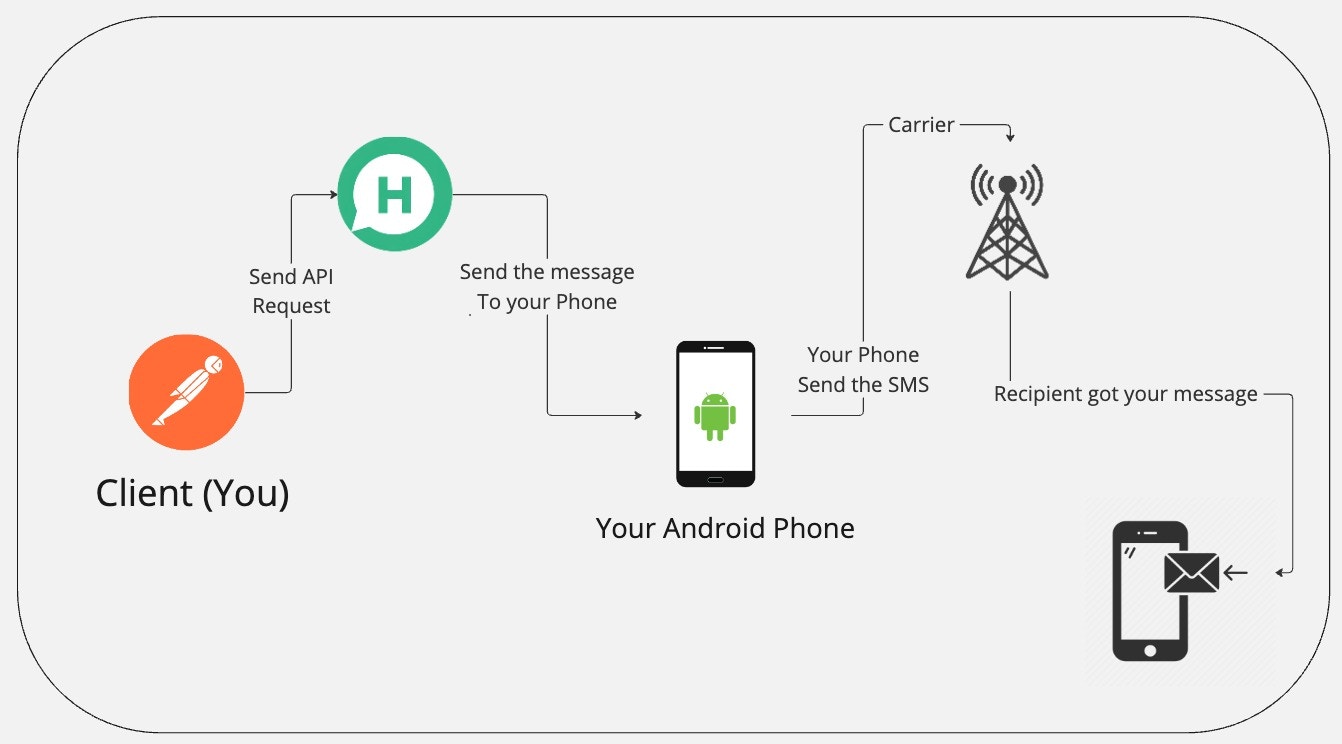 1. You send an API request to Hypersender.
2. Hypersender sends the request to your Android phone.
3. Your Android phone sends the request to the carrier network.
4. The carrier network sends the request to the recipient's phone.
Your Android phone must be connected to the internet for this to work.
## What is the Benefits?
* You can can send as many SMS as your SIM credit allows.
* Cost of sending SMS from your phone is significantly lower than using a third-party service.
## What is the Limitations?
* Your carrier network may charge you extra fees for international SMS.
* It's your responsibility to make sure that you keep your SIM card active.
* It's your responsibility to make sure that your phone is connected to the internet and has enough battery.
1. You send an API request to Hypersender.
2. Hypersender sends the request to your Android phone.
3. Your Android phone sends the request to the carrier network.
4. The carrier network sends the request to the recipient's phone.
Your Android phone must be connected to the internet for this to work.
## What is the Benefits?
* You can can send as many SMS as your SIM credit allows.
* Cost of sending SMS from your phone is significantly lower than using a third-party service.
## What is the Limitations?
* Your carrier network may charge you extra fees for international SMS.
* It's your responsibility to make sure that you keep your SIM card active.
* It's your responsibility to make sure that your phone is connected to the internet and has enough battery.