> ## Documentation Index
> Fetch the complete documentation index at: https://docs.hypersender.com/llms.txt
> Use this file to discover all available pages before exploring further.
# Introduction
> Hypersender Enterprise WhatsApp API Documentation - Premium Access & Advanced Features
Welcome to the **Hypersender Enterprise WhatsApp API** documentation! We're delighted to have you as one of our valued enterprise partners. This documentation is designed specifically for organizations like yours that demand powerful, scalable WhatsApp messaging solutions with advanced capabilities.
## What Makes Enterprise Special
As an enterprise client, you're at the heart of what we do. We've built Hypersender to scale with your business needs, and your enterprise subscription unlocks a premium experience:
Access to all standard API endpoints for WhatsApp messaging
Exclusive access to enterprise-grade features and advanced endpoints
Dedicated support team to ensure your success
Higher rate limits and throughput for mission-critical operations
Easily generate, revoke, and manage API tokens for your applications
## Your Complete API Toolkit
As an enterprise customer, you have access to:
1. **All Standard WhatsApp Endpoints** - Every feature available in our standard WhatsApp API, including sending and receiving messages, managing chats, handling media, and monitoring message status
2. **Enterprise-Exclusive Endpoints** - Advanced features designed for complex business workflows and large-scale WhatsApp operations
3. **Enhanced Performance** - Optimized infrastructure to handle your high-volume WhatsApp messaging needs
4. **Easily Manage API Tokens** - Generate, Revoke, and manage API tokens directly from the dashboard for secure access to your applications
This documentation focuses on the enterprise-specific features. You can also refer to our [standard WhatsApp API documentation](/v1/api-reference/whatsapp/introduction) for core functionality that's available across all plans.
## How it works
Hypersender provides a powerful API that enables you to send and receive WhatsApp messages using your Android devices. The system works seamlessly: your API requests are processed through our infrastructure and delivered to your connected devices, which then send messages to recipients through WhatsApp. The API provides comprehensive message receiving capabilities, media handling, and real-time message status monitoring.
## Enterprise-Specific Features
Your enterprise subscription includes access to advanced capabilities that streamline complex operations:
### Multi-Device Management
Efficiently manage multiple Android devices across your organization with centralized control and monitoring.
### Advanced Analytics
Gain deeper insights into your messaging operations with comprehensive analytics and reporting tools.
### Custom Webhooks
Configure sophisticated webhook routing and event handling for seamless integration with your systems.
### Instance Management API
Programmatically manage your WhatsApp instances with our powerful Instance Management API:
* **Check Instance Health** - Monitor connection status and readiness (10 req/min)
* **List Instances** - Retrieve and filter all your instances
* **Create Instance** - Provision new WhatsApp instances automatically (5 req/min)
* **Request New QR Code** - Generate fresh QR codes for authentication (1 req/min)
* **Restart Instance** - Resolve connection issues programmatically (5 req/min)
### Generate and Revoke API Tokens
Easily generate and revoke API tokens for secure access to your applications:
* **Generate Token** - Create new API tokens with customizable permissions (5 req/min)
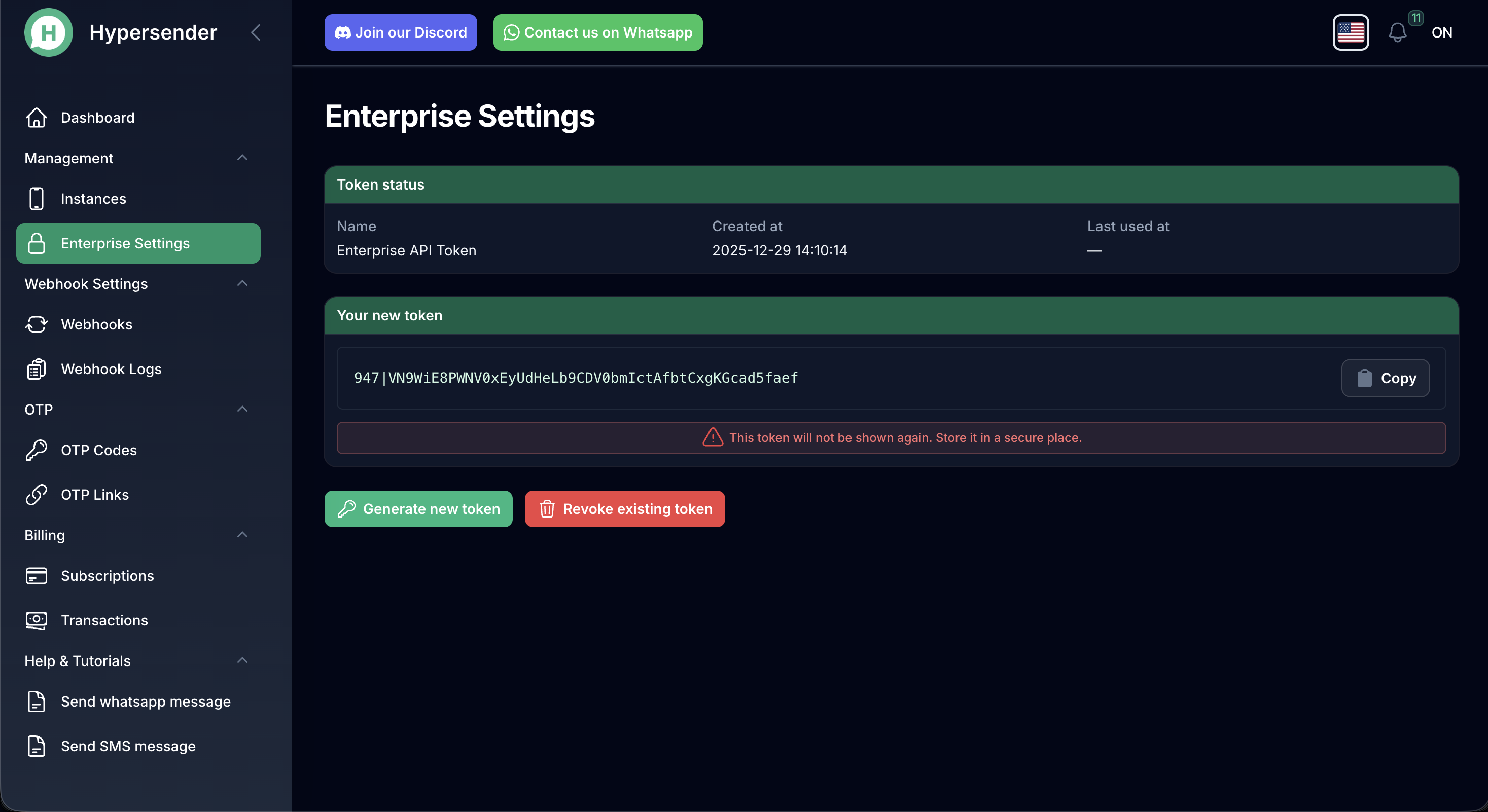 * **Revoke Token** - Invalidate existing tokens to maintain security (5 req/min)
 **Getting Started:** If you're new to Hypersender, we recommend starting with our [standard WhatsApp API documentation](/v1/api-reference/enterprise/introduction.mdx) to understand the core concepts, then explore the enterprise-specific features documented here.
## Getting Started
To help you get up and running quickly, here are some key resources and links:
Explore all standard WhatsApp API endpoints
Manage WhatsApp instances programmatically
Try sending your first WhatsApp message with Postman
Set up WhatsApp webhook integrations
Learn how to avoid getting blocked on WhatsApp
## Postman Collection
We've prepared a comprehensive Postman Collection to help you quickly explore and test our API endpoints.
Download the complete Enterprise API Postman Collection with all endpoints.
## Authentication
All API endpoints use secure Bearer token authentication. Your enterprise API keys provide access to both standard and enterprise-exclusive endpoints.
```json theme={null}
"security": [
{
"bearerAuth": []
}
]
```
**Security Best Practice:** Treat your API keys like passwords. Never expose them in client-side code or public repositories. Use environment variables and secure key management systems for production deployments.
## Support & Resources
As an enterprise customer, you have access to priority support:
* **Dedicated Account Manager:** Your primary point of contact for strategic discussions
* **Technical Support:** Priority access to our engineering team for technical issues
* **Documentation:** This comprehensive documentation, regularly updated with new features
**Need Help?** Your account manager is here to ensure your success. Don't hesitate to reach out with questions, feature requests, or integration challenges. We're invested in your success!
***
Thank you for choosing Hypersender Enterprise. We're excited to be part of your messaging infrastructure and look forward to supporting your growth. Let's build something amazing together! 🚀
**Getting Started:** If you're new to Hypersender, we recommend starting with our [standard WhatsApp API documentation](/v1/api-reference/enterprise/introduction.mdx) to understand the core concepts, then explore the enterprise-specific features documented here.
## Getting Started
To help you get up and running quickly, here are some key resources and links:
Explore all standard WhatsApp API endpoints
Manage WhatsApp instances programmatically
Try sending your first WhatsApp message with Postman
Set up WhatsApp webhook integrations
Learn how to avoid getting blocked on WhatsApp
## Postman Collection
We've prepared a comprehensive Postman Collection to help you quickly explore and test our API endpoints.
Download the complete Enterprise API Postman Collection with all endpoints.
## Authentication
All API endpoints use secure Bearer token authentication. Your enterprise API keys provide access to both standard and enterprise-exclusive endpoints.
```json theme={null}
"security": [
{
"bearerAuth": []
}
]
```
**Security Best Practice:** Treat your API keys like passwords. Never expose them in client-side code or public repositories. Use environment variables and secure key management systems for production deployments.
## Support & Resources
As an enterprise customer, you have access to priority support:
* **Dedicated Account Manager:** Your primary point of contact for strategic discussions
* **Technical Support:** Priority access to our engineering team for technical issues
* **Documentation:** This comprehensive documentation, regularly updated with new features
**Need Help?** Your account manager is here to ensure your success. Don't hesitate to reach out with questions, feature requests, or integration challenges. We're invested in your success!
***
Thank you for choosing Hypersender Enterprise. We're excited to be part of your messaging infrastructure and look forward to supporting your growth. Let's build something amazing together! 🚀