> ## Documentation Index
> Fetch the complete documentation index at: https://docs.hypersender.com/llms.txt
> Use this file to discover all available pages before exploring further.
# Generate OTP Link
> Generate an OTP link for passwordless authentication where users click a WhatsApp link to verify their identity.
## Overview
Generate a magic link for passwordless authentication via WhatsApp. Instead of typing a code, users simply click a pre-formatted WhatsApp link that automatically sends a verification message back to your system. This provides a seamless, user-friendly authentication experience.
## Quick Demo
**Learn how to generate a WhatsApp OTP link using Postman:** [Demo Link](/v2/api-reference/otp/generate-whatsapp-otp-link-with-hypersender-api)
## How It Works
1. Generate an OTP link request with custom messages
2. Receive a unique `code` and `whatsapp_link`
3. Send the WhatsApp link to your user (via email, SMS, or your app)
4. User clicks the link, which opens WhatsApp with a pre-filled message
5. User sends the message (containing the unique code)
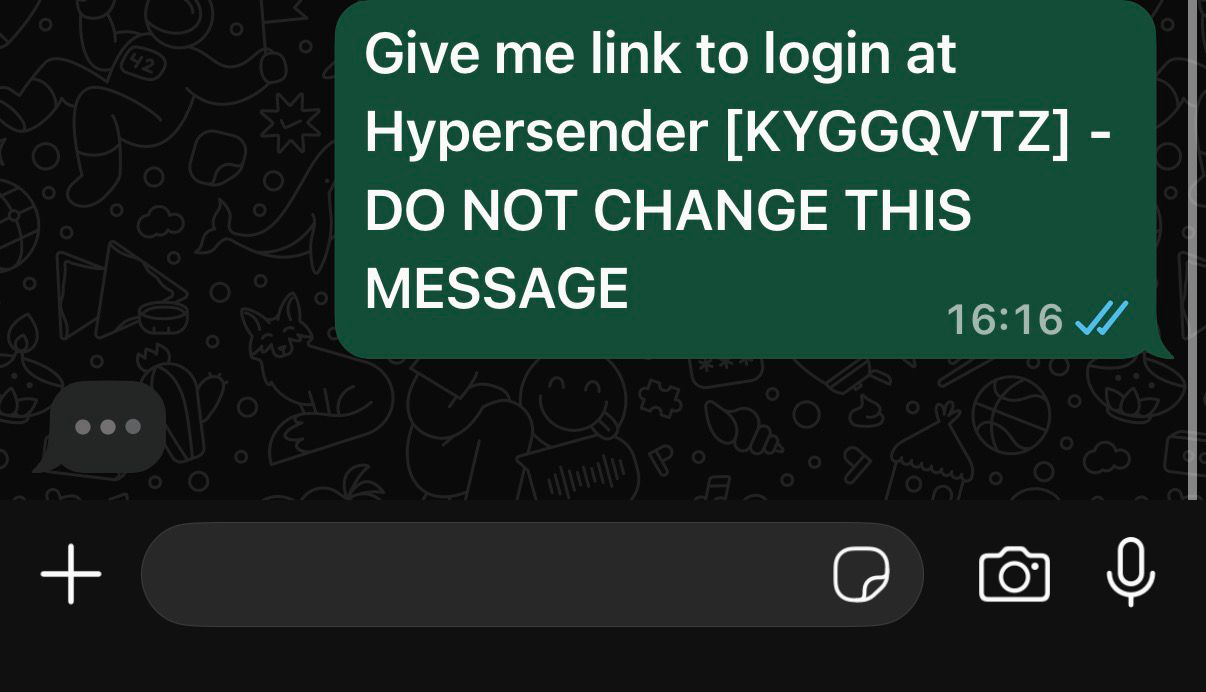 6. Your system receives the message via webhooks
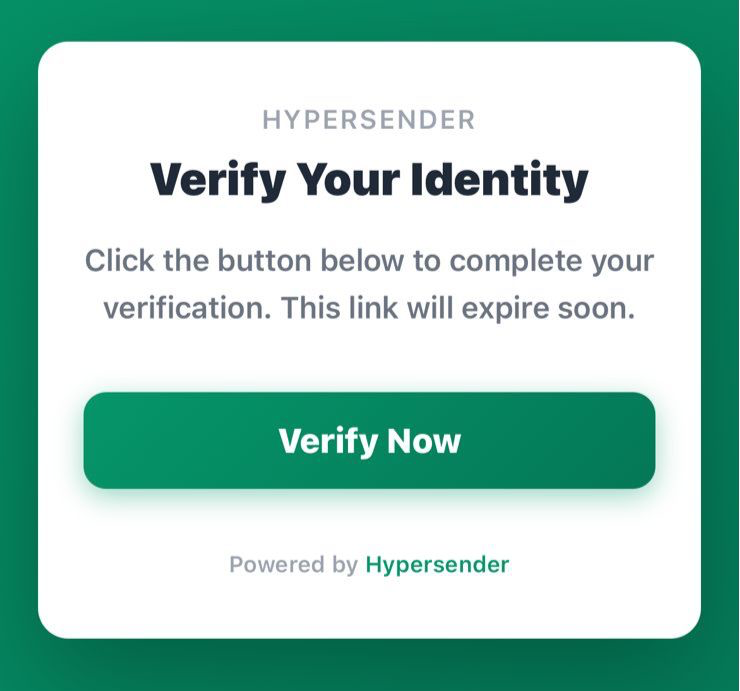
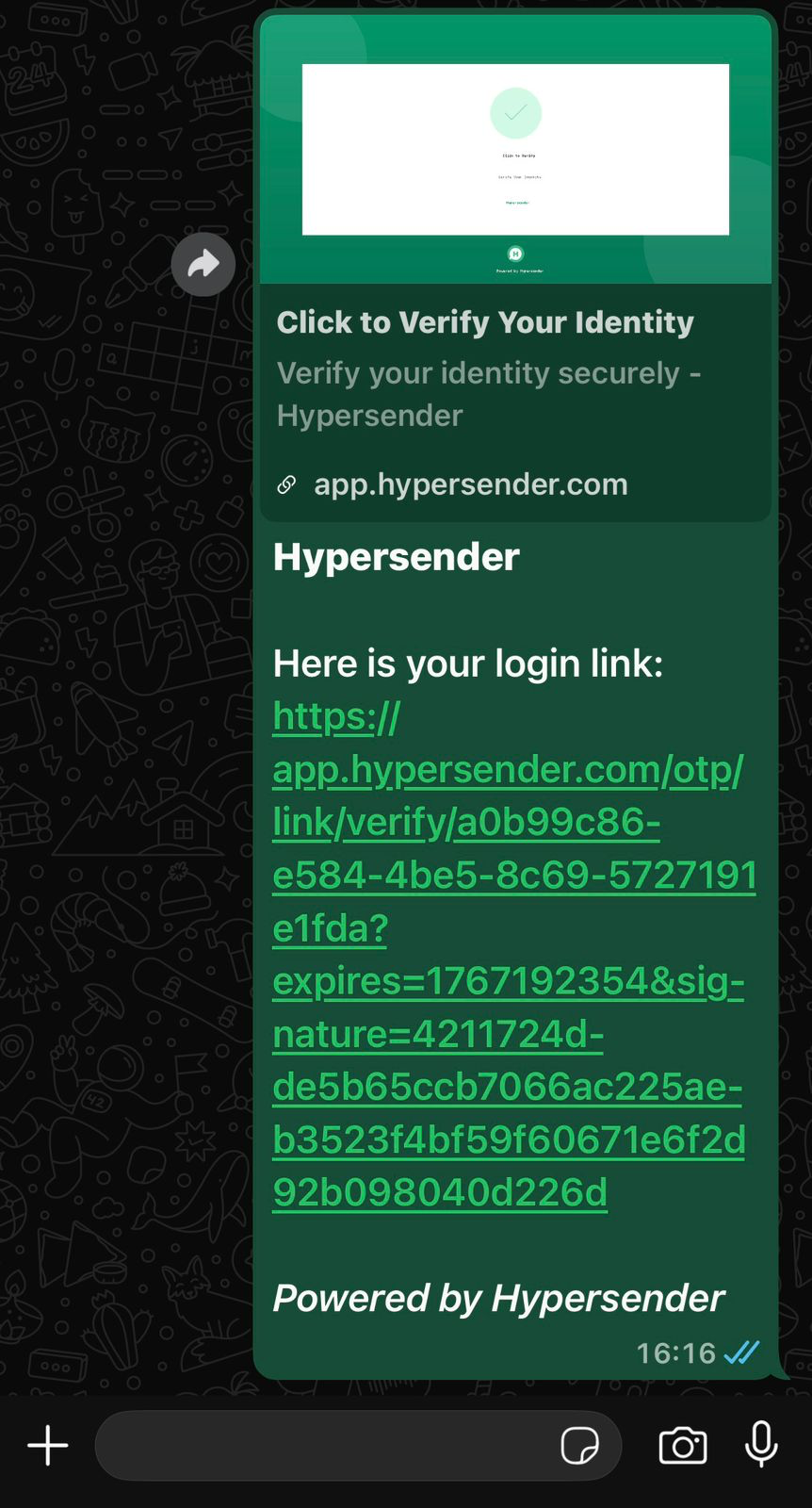 7. User clicks the link and verifies the action
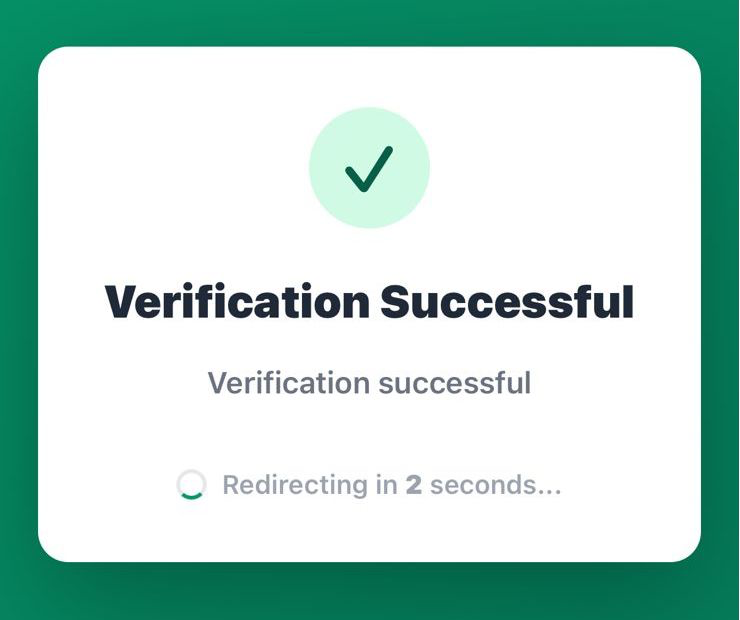
 8. After verification, the user is redirected to your application with access granted
 8. Use callbacks to handle success/failure events
## Parameters
### expires
Time-to-live (TTL) in seconds before the link expires. Default is `1800` seconds (30 minutes).
### name
Your application or service name to display in messages.
### message (object)
Custom messages for different stages of the verification flow:
* **prompt**: The message users see in the WhatsApp link (e.g., "Give me link to login at MyApp")
* **success**: Message sent when verification succeeds. Use `{link}` placeholder for the actual login/verification URL
* **failed**: Message sent when verification fails
* **expired**: Message sent when the link has expired
### callback (object)
Webhook URLs to receive verification events:
* **success**: URL called when user successfully verifies
* **failed**: URL called when verification fails
## Response
The response includes:
* `uuid`: Unique identifier for this OTP link request
* `code`: Short verification code (e.g., "RDYFQUBX")
* `chat_id`: The recipient's chat ID
* `status`: Current status (`pending`, `verified`, `failed`, or `expired`)
* `otp_type`: Type of OTP (always `link` for this endpoint)
* `expires_at`: ISO 8601 timestamp when the link expires
* `created_at`: ISO 8601 timestamp when the link was created
* `whatsapp_link`: The complete WhatsApp link to send to the user
## The WhatsApp Link
The generated `whatsapp_link` follows this format:
```
https://wa.me/20123456789?text=Give+me+link+to+login+at+Hypersender+%5BNFBNWZSF%5D+-+DO+NOT+CHANGE+THIS+MESSAGE
```
Key components:
* Pre-fills WhatsApp with the prompt message
* Includes the unique verification code in brackets
* Warns users not to modify the message
## Usage Example
```php theme={null}
use Illuminate\Support\Facades\Http;
$response = Http::withToken('YOUR_API_TOKEN')
->post('https://app.hypersender.com/api/otp/v2/{instance}/generate-link', [
'expires' => 1800,
'name' => 'YourAppName',
'message' => [
'prompt' => 'Give me link to login at YourApp',
'success' => 'Welcome! Here is your login link: {link}',
'failed' => 'Login failed. Please try again.',
'expired' => 'This link has expired. Please request a new one.'
],
'callback' => [
'success' => 'https://yourdomain.com/api/otp/success',
'failed' => 'https://yourdomain.com/api/otp/failed'
]
]);
$result = $response->json();
$magicLink = $result['data']['whatsapp_link'] ?? null;
// Send this link to the user via your preferred channel
info('Send this link to user: ' . $magicLink);
```
## Implementation Flow
### 1. Generate the Link
Call this endpoint to create a verification link for your user.
### 2. Deliver the Link
Send the `whatsapp_link` to your user through:
* Email
* SMS
* In-app notification
* Web page display
### 3. User Clicks Link
When clicked, the link:
* Opens WhatsApp (mobile) or WhatsApp Web
* Pre-fills a message with the verification code
* User just needs to tap "Send"
### 4. Handle Callbacks
Your callback URLs will receive POST requests with the verification result:
```json theme={null}
{
"uuid": "a0b5e14e-95da-4bd4-9e2a-071661244bef",
"code": "RDYFQUBX",
"chat_id": "20123456789@c.us",
"status": "verified",
"verified_at": "2025-12-29T17:50:00+00:00"
}
```
### 5. Respond to User
Based on the callback, send the appropriate message:
* **Success**: Send the login link or access token
* **Failed**: Notify user of the error
* **Expired**: Prompt user to request a new link
## Message Placeholders
Use these placeholders in your message templates:
* `{link}`: Replaced with the actual authentication/login URL
* `{name}`: Your application name
* `{code}`: The verification code
## Use Cases
1. **Passwordless Login**: Let users log in without typing passwords
2. **Two-Factor Authentication**: Add an extra security layer
3. **Phone Verification**: Verify phone numbers during signup
4. **Account Recovery**: Secure account recovery flow
5. **Secure Actions**: Verify sensitive operations (payments, settings changes)
The link-based OTP provides better UX than code-based OTP because users don't need to switch between apps to copy/paste codes. It's especially effective on mobile devices where WhatsApp is already installed.
Ensure your webhook endpoints (callback URLs) are secure and can handle incoming POST requests. Always validate the request signature or use API keys to verify requests are coming from Hypersender.
## Security Considerations
1. **HTTPS Only**: Always use HTTPS for callback URLs
2. **Verify Callbacks**: Validate incoming webhook requests
3. **Short Expiration**: Use shorter TTL for sensitive operations
4. **Rate Limiting**: Implement limits on link generation per user
5. **One-Time Use**: Links should be invalidated after use
6. **Monitor Failed Attempts**: Track and alert on suspicious patterns
## Monitoring
Track these metrics for security and UX optimization:
* Link generation rate
* Click-through rate (users who click the link)
* Verification success rate
* Expiration rate (links that expire unused)
* Failed verification attempts
* Average time to verification
## OpenAPI
````yaml v2/api-reference/otp/otp-collection.json POST /{instance}/generate-link
openapi: 3.1.0
info:
version: v2.0
title: Hypersender OTP API Docs
description: ''
servers:
- url: https://app.hypersender.com/api/otp/v2
description: Production
security:
- Authorization: []
paths:
/{instance}/generate-link:
post:
summary: Generate OTP link
description: >-
Generate an OTP link for the chat; returns a short code and a whatsapp
link template.
operationId: generateLink
parameters:
- $ref: '#/components/parameters/instance'
requestBody:
required: true
content:
application/json:
schema:
$ref: '#/components/schemas/GenerateLinkRequest'
examples:
request:
value:
expires: 1800
name: Hypersender
message:
prompt: Give me link to login at hypersender
success: 'Here is your login link: {link}'
failed: Login failed, please try again later.
expired: The link has been expired, please try another one.
callback:
success: https://yourdomain.com/callback/success
failed: https://yourdomain.com/callback/failed
responses:
'200':
description: Link created
content:
application/json:
schema:
$ref: '#/components/schemas/GenerateLinkResponse'
examples:
response:
value:
success: true
message: OTP link request created successfully
data:
uuid: a0b5e14e-95da-4bd4-9e2a-071661244bef
code: RDYFQUBX
chat_id: 20123456789@c.us
status: pending
otp_type: link
expires_at: '2025-12-29T18:14:55+00:00'
created_at: '2025-12-29T17:44:55+00:00'
whatsapp_link: >-
https://wa.me/201553730661?text=Give+me+link+to+login+at+7enkesh+%5BRDYFQUBX%5D+-+DO+NOT+CHANGE+THIS+MESSAGE
components:
parameters:
instance:
name: instance
in: path
description: Hypersender instance UUID
required: true
schema:
type: string
example: '{{ instance_id }}'
schemas:
GenerateLinkRequest:
type: object
properties:
expires:
type: integer
description: TTL in seconds
name:
type: string
message:
type: object
properties:
prompt:
type: string
success:
type: string
failed:
type: string
expired:
type: string
callback:
type: object
properties:
success:
type: string
failed:
type: string
required:
- chatId
GenerateLinkResponse:
type: object
properties:
success:
type: boolean
message:
type: string
data:
type: object
properties:
uuid:
type: string
code:
type: string
chat_id:
type: string
status:
type: string
otp_type:
type: string
expires_at:
type: string
format: date-time
created_at:
type: string
format: date-time
whatsapp_link:
type: string
securitySchemes:
Authorization:
type: http
scheme: bearer
````
8. Use callbacks to handle success/failure events
## Parameters
### expires
Time-to-live (TTL) in seconds before the link expires. Default is `1800` seconds (30 minutes).
### name
Your application or service name to display in messages.
### message (object)
Custom messages for different stages of the verification flow:
* **prompt**: The message users see in the WhatsApp link (e.g., "Give me link to login at MyApp")
* **success**: Message sent when verification succeeds. Use `{link}` placeholder for the actual login/verification URL
* **failed**: Message sent when verification fails
* **expired**: Message sent when the link has expired
### callback (object)
Webhook URLs to receive verification events:
* **success**: URL called when user successfully verifies
* **failed**: URL called when verification fails
## Response
The response includes:
* `uuid`: Unique identifier for this OTP link request
* `code`: Short verification code (e.g., "RDYFQUBX")
* `chat_id`: The recipient's chat ID
* `status`: Current status (`pending`, `verified`, `failed`, or `expired`)
* `otp_type`: Type of OTP (always `link` for this endpoint)
* `expires_at`: ISO 8601 timestamp when the link expires
* `created_at`: ISO 8601 timestamp when the link was created
* `whatsapp_link`: The complete WhatsApp link to send to the user
## The WhatsApp Link
The generated `whatsapp_link` follows this format:
```
https://wa.me/20123456789?text=Give+me+link+to+login+at+Hypersender+%5BNFBNWZSF%5D+-+DO+NOT+CHANGE+THIS+MESSAGE
```
Key components:
* Pre-fills WhatsApp with the prompt message
* Includes the unique verification code in brackets
* Warns users not to modify the message
## Usage Example
```php theme={null}
use Illuminate\Support\Facades\Http;
$response = Http::withToken('YOUR_API_TOKEN')
->post('https://app.hypersender.com/api/otp/v2/{instance}/generate-link', [
'expires' => 1800,
'name' => 'YourAppName',
'message' => [
'prompt' => 'Give me link to login at YourApp',
'success' => 'Welcome! Here is your login link: {link}',
'failed' => 'Login failed. Please try again.',
'expired' => 'This link has expired. Please request a new one.'
],
'callback' => [
'success' => 'https://yourdomain.com/api/otp/success',
'failed' => 'https://yourdomain.com/api/otp/failed'
]
]);
$result = $response->json();
$magicLink = $result['data']['whatsapp_link'] ?? null;
// Send this link to the user via your preferred channel
info('Send this link to user: ' . $magicLink);
```
## Implementation Flow
### 1. Generate the Link
Call this endpoint to create a verification link for your user.
### 2. Deliver the Link
Send the `whatsapp_link` to your user through:
* Email
* SMS
* In-app notification
* Web page display
### 3. User Clicks Link
When clicked, the link:
* Opens WhatsApp (mobile) or WhatsApp Web
* Pre-fills a message with the verification code
* User just needs to tap "Send"
### 4. Handle Callbacks
Your callback URLs will receive POST requests with the verification result:
```json theme={null}
{
"uuid": "a0b5e14e-95da-4bd4-9e2a-071661244bef",
"code": "RDYFQUBX",
"chat_id": "20123456789@c.us",
"status": "verified",
"verified_at": "2025-12-29T17:50:00+00:00"
}
```
### 5. Respond to User
Based on the callback, send the appropriate message:
* **Success**: Send the login link or access token
* **Failed**: Notify user of the error
* **Expired**: Prompt user to request a new link
## Message Placeholders
Use these placeholders in your message templates:
* `{link}`: Replaced with the actual authentication/login URL
* `{name}`: Your application name
* `{code}`: The verification code
## Use Cases
1. **Passwordless Login**: Let users log in without typing passwords
2. **Two-Factor Authentication**: Add an extra security layer
3. **Phone Verification**: Verify phone numbers during signup
4. **Account Recovery**: Secure account recovery flow
5. **Secure Actions**: Verify sensitive operations (payments, settings changes)
The link-based OTP provides better UX than code-based OTP because users don't need to switch between apps to copy/paste codes. It's especially effective on mobile devices where WhatsApp is already installed.
Ensure your webhook endpoints (callback URLs) are secure and can handle incoming POST requests. Always validate the request signature or use API keys to verify requests are coming from Hypersender.
## Security Considerations
1. **HTTPS Only**: Always use HTTPS for callback URLs
2. **Verify Callbacks**: Validate incoming webhook requests
3. **Short Expiration**: Use shorter TTL for sensitive operations
4. **Rate Limiting**: Implement limits on link generation per user
5. **One-Time Use**: Links should be invalidated after use
6. **Monitor Failed Attempts**: Track and alert on suspicious patterns
## Monitoring
Track these metrics for security and UX optimization:
* Link generation rate
* Click-through rate (users who click the link)
* Verification success rate
* Expiration rate (links that expire unused)
* Failed verification attempts
* Average time to verification
## OpenAPI
````yaml v2/api-reference/otp/otp-collection.json POST /{instance}/generate-link
openapi: 3.1.0
info:
version: v2.0
title: Hypersender OTP API Docs
description: ''
servers:
- url: https://app.hypersender.com/api/otp/v2
description: Production
security:
- Authorization: []
paths:
/{instance}/generate-link:
post:
summary: Generate OTP link
description: >-
Generate an OTP link for the chat; returns a short code and a whatsapp
link template.
operationId: generateLink
parameters:
- $ref: '#/components/parameters/instance'
requestBody:
required: true
content:
application/json:
schema:
$ref: '#/components/schemas/GenerateLinkRequest'
examples:
request:
value:
expires: 1800
name: Hypersender
message:
prompt: Give me link to login at hypersender
success: 'Here is your login link: {link}'
failed: Login failed, please try again later.
expired: The link has been expired, please try another one.
callback:
success: https://yourdomain.com/callback/success
failed: https://yourdomain.com/callback/failed
responses:
'200':
description: Link created
content:
application/json:
schema:
$ref: '#/components/schemas/GenerateLinkResponse'
examples:
response:
value:
success: true
message: OTP link request created successfully
data:
uuid: a0b5e14e-95da-4bd4-9e2a-071661244bef
code: RDYFQUBX
chat_id: 20123456789@c.us
status: pending
otp_type: link
expires_at: '2025-12-29T18:14:55+00:00'
created_at: '2025-12-29T17:44:55+00:00'
whatsapp_link: >-
https://wa.me/201553730661?text=Give+me+link+to+login+at+7enkesh+%5BRDYFQUBX%5D+-+DO+NOT+CHANGE+THIS+MESSAGE
components:
parameters:
instance:
name: instance
in: path
description: Hypersender instance UUID
required: true
schema:
type: string
example: '{{ instance_id }}'
schemas:
GenerateLinkRequest:
type: object
properties:
expires:
type: integer
description: TTL in seconds
name:
type: string
message:
type: object
properties:
prompt:
type: string
success:
type: string
failed:
type: string
expired:
type: string
callback:
type: object
properties:
success:
type: string
failed:
type: string
required:
- chatId
GenerateLinkResponse:
type: object
properties:
success:
type: boolean
message:
type: string
data:
type: object
properties:
uuid:
type: string
code:
type: string
chat_id:
type: string
status:
type: string
otp_type:
type: string
expires_at:
type: string
format: date-time
created_at:
type: string
format: date-time
whatsapp_link:
type: string
securitySchemes:
Authorization:
type: http
scheme: bearer
````