> ## Documentation Index
> Fetch the complete documentation index at: https://docs.hypersender.com/llms.txt
> Use this file to discover all available pages before exploring further.
# Validate OTP Code
> Validate an OTP code previously generated for a chat to confirm user authentication.
## Overview
Verify an OTP code that was previously sent to a user via the [Request OTP Code](/v2/api-reference/otp/otp-service/request-code) endpoint. This endpoint checks if the provided code matches the active OTP for the given chat ID.
## How It Works
1. User receives OTP code via WhatsApp
2. User enters the code in your application
3. Send the `chatId` and `code` to this endpoint
4. The system validates:
* Code matches the active OTP
* Code hasn't expired
* Code hasn't been used already
5. Returns validation result with status update
## Quick Demo
**Learn how to send an OTP code using Postman:** [Demo Link](/v2/api-reference/otp/how-to-use-otp-api-in-postman)
## Parameters
### chatId (required)
The WhatsApp chat ID that received the OTP code (e.g., `20123456789@c.us`)
### code (required)
The OTP code provided by the user to validate
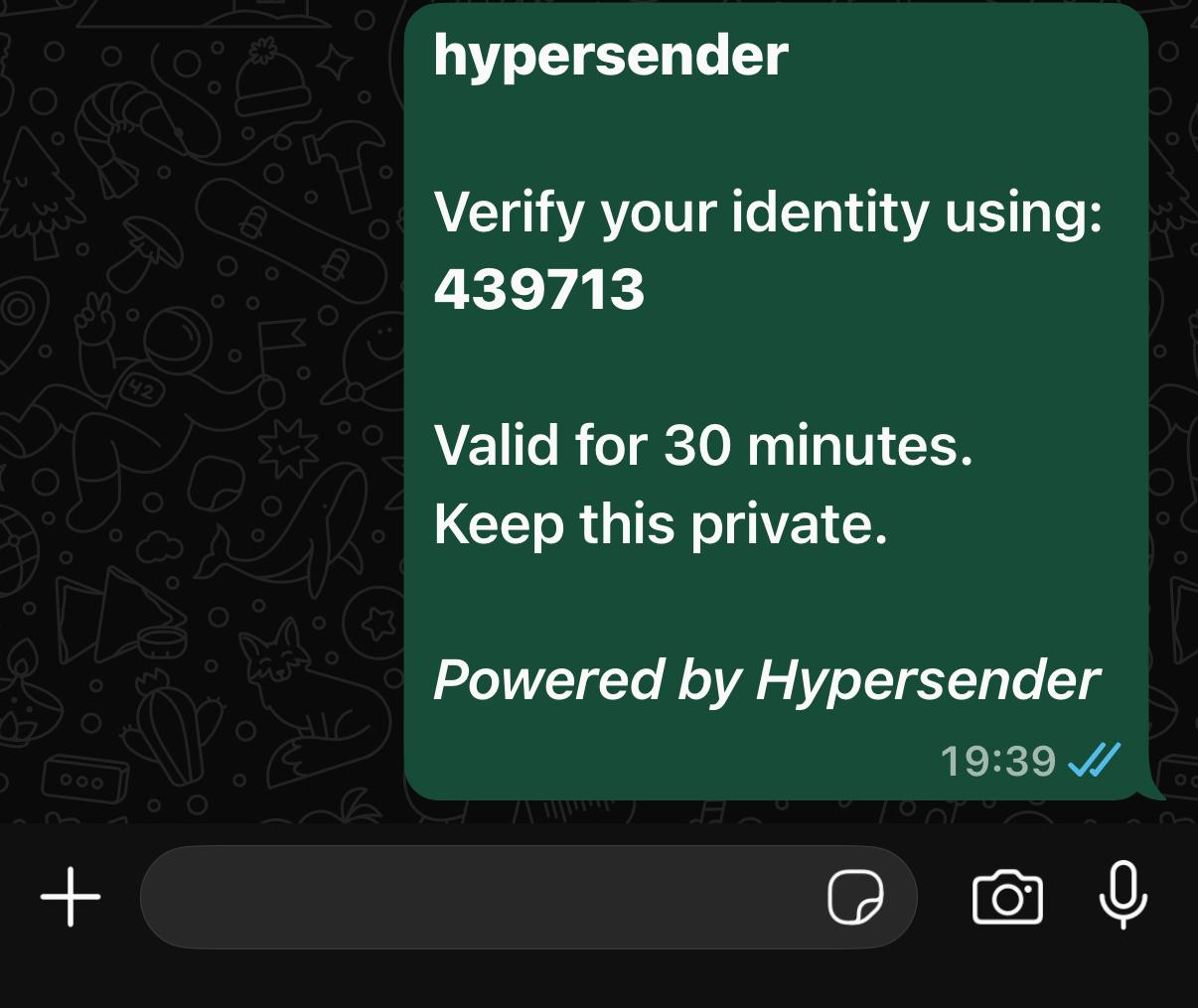
## Showcase Example Message
 ## Response
The response includes:
* `success`: Boolean indicating if validation was successful
* `message`: Descriptive message about the validation result
* `data.uuid`: The unique identifier of the OTP request
* `data.chat_id`: The chat ID associated with this OTP
* `data.status`: Updated status (typically `validated` on success)
* `data.validated_at`: ISO 8601 timestamp when the code was validated
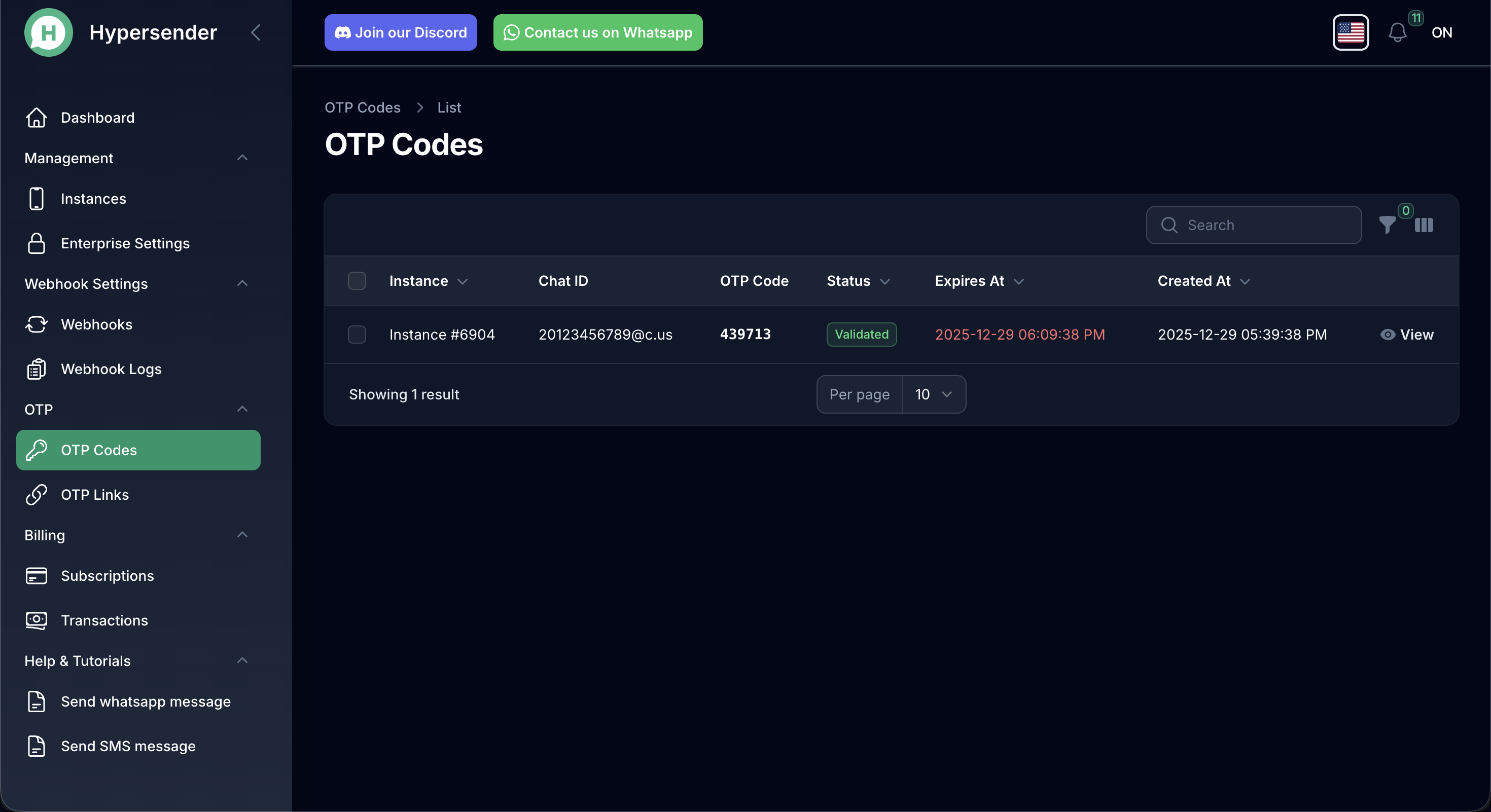
## View All of your OTP Requests
## Response
The response includes:
* `success`: Boolean indicating if validation was successful
* `message`: Descriptive message about the validation result
* `data.uuid`: The unique identifier of the OTP request
* `data.chat_id`: The chat ID associated with this OTP
* `data.status`: Updated status (typically `validated` on success)
* `data.validated_at`: ISO 8601 timestamp when the code was validated
## View All of your OTP Requests
 ## Validation Rules
The code validation will **fail** if:
* The code doesn't match the active OTP for the chat
* The code has expired based on the `expires` parameter
* The code has already been validated (codes are single-use)
* No active OTP exists for the provided `chatId`
## Usage Example
```php theme={null}
use Illuminate\Support\Facades\Http;
$response = Http::withToken('YOUR_API_TOKEN')
->post('https://app.hypersender.com/api/otp/v2/{instance}/validate-code', [
'chatId' => '20123456789@c.us',
'code' => '439713',
]);
$result = $response->json();
if (($result['success'] ?? false) && (($result['data']['status'] ?? '') === 'validated')) {
// Code is valid - proceed with user authentication
info('User verified successfully!');
} else {
// Code is invalid or expired
info('Verification failed: ' . ($result['message'] ?? 'Unknown error'));
}
```
## Error Handling
Common validation failures:
* **Invalid Code**: The code doesn't match
* **Expired Code**: The TTL period has passed
* **Already Used**: The code was previously validated
* **No Active OTP**: No pending OTP found for this chat
OTP codes are single-use only. Once validated successfully, the same code cannot be used again. Users will need to request a new code if they need to authenticate again.
## Security Best Practices
1. **Rate Limiting**: Implement rate limiting on validation attempts to prevent brute-force attacks
2. **Maximum Attempts**: Consider limiting failed validation attempts (e.g., 3-5 tries) before requiring a new code
3. **Secure Storage**: Never log or store OTP codes in plain text
4. **HTTPS Only**: Always use HTTPS for API calls containing OTP codes
5. **Short Expiration**: Use shorter expiration times (5-10 minutes) for sensitive operations
After successful validation, immediately proceed with your authentication flow. The validated status ensures this specific OTP cannot be reused.
## OpenAPI
````yaml v2/api-reference/otp/otp-collection.json POST /{instance}/validate-code
openapi: 3.1.0
info:
version: v2.0
title: Hypersender OTP API Docs
description: ''
servers:
- url: https://app.hypersender.com/api/otp/v2
description: Production
security:
- Authorization: []
paths:
/{instance}/validate-code:
post:
summary: Validate OTP code
description: Validate an OTP code previously generated for a chat.
operationId: validateCode
parameters:
- $ref: '#/components/parameters/instance'
requestBody:
required: true
content:
application/json:
schema:
$ref: '#/components/schemas/ValidateCodeRequest'
examples:
request:
value:
chatId: 20123456789@c.us
code: '439713'
responses:
'200':
description: Successful validation
content:
application/json:
schema:
$ref: '#/components/schemas/ValidateCodeResponse'
examples:
response:
value:
success: true
message: OTP code validated successfully
data:
uuid: a0b5df6a-b491-4190-80a5-38d85a2a4836
chat_id: 20123456789@c.us
status: validated
validated_at: '2025-12-29T17:43:36+00:00'
components:
parameters:
instance:
name: instance
in: path
description: Hypersender instance UUID
required: true
schema:
type: string
example: '{{ instance_id }}'
schemas:
ValidateCodeRequest:
type: object
properties:
chatId:
type: string
code:
type: string
required:
- chatId
- code
ValidateCodeResponse:
type: object
properties:
success:
type: boolean
message:
type: string
data:
type: object
properties:
uuid:
type: string
chat_id:
type: string
status:
type: string
validated_at:
type: string
format: date-time
securitySchemes:
Authorization:
type: http
scheme: bearer
````
## Validation Rules
The code validation will **fail** if:
* The code doesn't match the active OTP for the chat
* The code has expired based on the `expires` parameter
* The code has already been validated (codes are single-use)
* No active OTP exists for the provided `chatId`
## Usage Example
```php theme={null}
use Illuminate\Support\Facades\Http;
$response = Http::withToken('YOUR_API_TOKEN')
->post('https://app.hypersender.com/api/otp/v2/{instance}/validate-code', [
'chatId' => '20123456789@c.us',
'code' => '439713',
]);
$result = $response->json();
if (($result['success'] ?? false) && (($result['data']['status'] ?? '') === 'validated')) {
// Code is valid - proceed with user authentication
info('User verified successfully!');
} else {
// Code is invalid or expired
info('Verification failed: ' . ($result['message'] ?? 'Unknown error'));
}
```
## Error Handling
Common validation failures:
* **Invalid Code**: The code doesn't match
* **Expired Code**: The TTL period has passed
* **Already Used**: The code was previously validated
* **No Active OTP**: No pending OTP found for this chat
OTP codes are single-use only. Once validated successfully, the same code cannot be used again. Users will need to request a new code if they need to authenticate again.
## Security Best Practices
1. **Rate Limiting**: Implement rate limiting on validation attempts to prevent brute-force attacks
2. **Maximum Attempts**: Consider limiting failed validation attempts (e.g., 3-5 tries) before requiring a new code
3. **Secure Storage**: Never log or store OTP codes in plain text
4. **HTTPS Only**: Always use HTTPS for API calls containing OTP codes
5. **Short Expiration**: Use shorter expiration times (5-10 minutes) for sensitive operations
After successful validation, immediately proceed with your authentication flow. The validated status ensures this specific OTP cannot be reused.
## OpenAPI
````yaml v2/api-reference/otp/otp-collection.json POST /{instance}/validate-code
openapi: 3.1.0
info:
version: v2.0
title: Hypersender OTP API Docs
description: ''
servers:
- url: https://app.hypersender.com/api/otp/v2
description: Production
security:
- Authorization: []
paths:
/{instance}/validate-code:
post:
summary: Validate OTP code
description: Validate an OTP code previously generated for a chat.
operationId: validateCode
parameters:
- $ref: '#/components/parameters/instance'
requestBody:
required: true
content:
application/json:
schema:
$ref: '#/components/schemas/ValidateCodeRequest'
examples:
request:
value:
chatId: 20123456789@c.us
code: '439713'
responses:
'200':
description: Successful validation
content:
application/json:
schema:
$ref: '#/components/schemas/ValidateCodeResponse'
examples:
response:
value:
success: true
message: OTP code validated successfully
data:
uuid: a0b5df6a-b491-4190-80a5-38d85a2a4836
chat_id: 20123456789@c.us
status: validated
validated_at: '2025-12-29T17:43:36+00:00'
components:
parameters:
instance:
name: instance
in: path
description: Hypersender instance UUID
required: true
schema:
type: string
example: '{{ instance_id }}'
schemas:
ValidateCodeRequest:
type: object
properties:
chatId:
type: string
code:
type: string
required:
- chatId
- code
ValidateCodeResponse:
type: object
properties:
success:
type: boolean
message:
type: string
data:
type: object
properties:
uuid:
type: string
chat_id:
type: string
status:
type: string
validated_at:
type: string
format: date-time
securitySchemes:
Authorization:
type: http
scheme: bearer
````