> ## Documentation Index
> Fetch the complete documentation index at: https://docs.hypersender.com/llms.txt
> Use this file to discover all available pages before exploring further.
# Introduction
> Hypersender SMS API Docs
Send and receive sms messages, with Hypersender SMS API. This Documentation provides a comprehensive guide to the API, including detailed information on how to send and receive sms messages, controll message threads, and monitor phone heartbeats.
## How it works
Hypersender SMS is just an API that allows you to send SMS messages using your android phone's SIM card. The API works by sending a message to your phone, and then your phone sends the message to the recipient. The API also allows you to receive messages, and monitor your phone's heartbeats.
**Sender Name Limitation:**
When sending SMS messages through the Hypersender API, the recipient will see the message as coming from your phone number rather than a custom sender name or business name. Custom sender names require extensive business verification processes and regulatory compliance that can take weeks or months to complete. Our API is designed to provide immediate SMS functionality using your existing phone number, offering a streamlined solution for your messaging needs. Please ensure your recipients are aware of this when setting up your messaging workflows.
## Receive Messages
To receive messages, you need to have the Hypersender app installed on your android phone. The app will receive the messages, and then send them to the specified webhook.
## Heartbeats
Heartbeats are like signles that used to monitor the status of your phone. your phone will send a heartbeat to the API every 15 minutes, to let the API know that it's still online.
If your phone doesn't send a heartbeat for more than 2 hours, the API will consider your phone as offline.
## Working with android app
To use the API, you need to have the Hypersender app installed on your android phone. The app will receive the messages and send them to the recipient.
### Download the app
You can download it from the release page on [github](https://github.com/hypersender/sms-app-releases/releases).
Currently, the app is only available for android. You can't use the app on iOS.
### How to use the app
Download the app from the release page.
Install the app on your android phone.
Grant the app the necessary permissions, see the [permissions](https://docs.hypersender.com/docs/hypersender/overview/sms-quick-start#step-4-download-the-hypersender-sms-app) section for more information.
Open the app, and scan the QR code to link the app with the API.
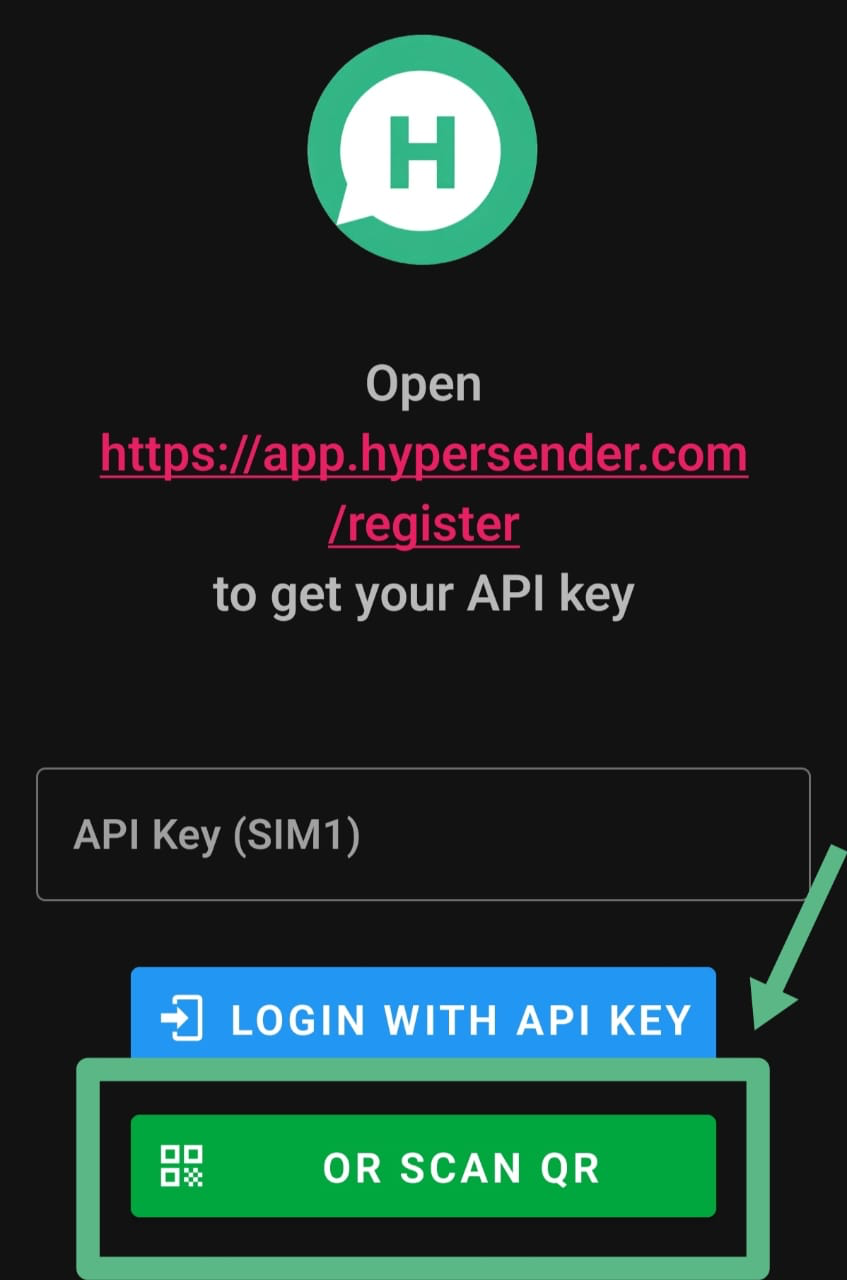 The app will start receiving messages, and then send them to the recipient.
### Why the app is not on the play store
Currently, the app is only available for android. Google Play Store currently doesn't allow SMS apps, so you can't download the app from the store.
We recommend using a secondary phone number, because the app will send and receive messages using your phone's SIM card.
### Why android only
The app is only available for android because of the restrictions on iOS. Apple doesn't allow apps to send SMS messages, so we can't make an app for iOS.
## cost of sending messages
We don't charge you for sending messages, but for using the API. Please check the pricing page for more information.
Sending costs is different from one country to another, and directly depends on the carrier's pricing and offers.
## Quick Demo
**Learn how to use Hypersender SMS API to send a message using Postman:** [Demo Link](/docs/sms/how-to-send-sms-message-in-postman)
## bulk sending
Currently, the API doesn't support bulk sending, but you can send multiple messages by sending multiple requests.
## international messaging
As long as you have an android phone and SIM card you can send messages from anywhere in the world but take into consideration that the carrier may charge you significantly more for international messaging.
## postman collection
You can download SMS API Postman Collection to easily interact with our API.
Download SMS API Postman Collection.
## Authentication
All API endpoints are authenticated using Bearer tokens and picked up from the specification file.
```json theme={null}
"security": [
{
"bearerAuth": []
}
]
```
The app will start receiving messages, and then send them to the recipient.
### Why the app is not on the play store
Currently, the app is only available for android. Google Play Store currently doesn't allow SMS apps, so you can't download the app from the store.
We recommend using a secondary phone number, because the app will send and receive messages using your phone's SIM card.
### Why android only
The app is only available for android because of the restrictions on iOS. Apple doesn't allow apps to send SMS messages, so we can't make an app for iOS.
## cost of sending messages
We don't charge you for sending messages, but for using the API. Please check the pricing page for more information.
Sending costs is different from one country to another, and directly depends on the carrier's pricing and offers.
## Quick Demo
**Learn how to use Hypersender SMS API to send a message using Postman:** [Demo Link](/docs/sms/how-to-send-sms-message-in-postman)
## bulk sending
Currently, the API doesn't support bulk sending, but you can send multiple messages by sending multiple requests.
## international messaging
As long as you have an android phone and SIM card you can send messages from anywhere in the world but take into consideration that the carrier may charge you significantly more for international messaging.
## postman collection
You can download SMS API Postman Collection to easily interact with our API.
Download SMS API Postman Collection.
## Authentication
All API endpoints are authenticated using Bearer tokens and picked up from the specification file.
```json theme={null}
"security": [
{
"bearerAuth": []
}
]
```