> ## Documentation Index
> Fetch the complete documentation index at: https://docs.hypersender.com/llms.txt
> Use this file to discover all available pages before exploring further.
# React to Message
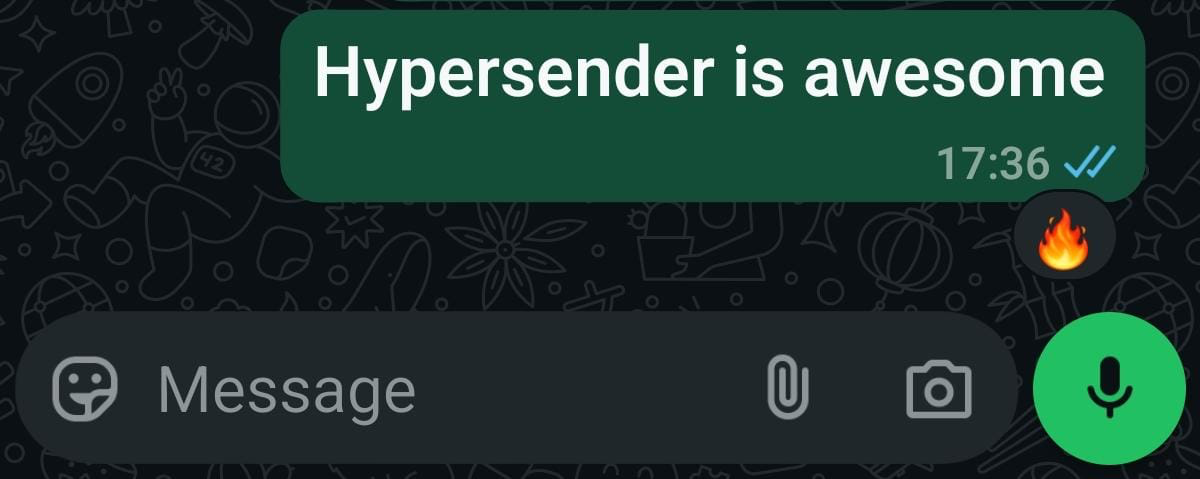
> Add a reaction to a message.
**V2 Queued Response:** All API requests in V2 are queued for improved reliability. You'll receive an immediate response with a `queued_request_uuid` that you can use to check the actual message status.
## Response Format
All requests return a queued response:
```json theme={null}
{
"queued": true,
"message": "Processing your request...",
"queued_request_uuid": "a0816120-7e37-4e8b-8cf3-92deb2cdc133",
"queued_request_link": "https://app.hypersender.com/api/whatsapp/v2/{instance}/queued-requests/a0816120-7e37-4e8b-8cf3-92deb2cdc133"
}
```
Use the `queued_request_link` or the [Get Queued Request](/v2/api-reference/whatsapp/queued-requests/get-queued-request) endpoint to check the actual message response once it's processed.
More details on queued requests can be found in the [Queued Requests Documentation](/v2/api-reference/whatsapp/queued-requests).
***
Add a reaction to a message.
 ## OpenAPI
````yaml v2/api-reference/whatsapp/whatsapp-collection.json PUT /{instance}/react-to-message
openapi: 3.1.0
info:
version: v2.0
title: Hypersender WhatsApp API Docs
description: >
The Hypersender WhatsApp API is a powerful api to send and recieve messages
using your own whatsapp number.
Without the high costs of Meta's Whatsapp business API.
In this Docs you'll learn how to use and integrate Hypersnder Whatsapp API
into your existing system/service or application using simple API endpoints.
## What's New in V2?
**Queued Responses:** All requests in V2 are now queued for improved
reliability and performance. When you make a request, you'll receive an
immediate response with a `queued_request_uuid` that you can use to check
the status of your request.
**Example Response:**
```json
{
"queued": true,
"message": "Processing your request...",
"queued_request_uuid": "a0816120-7e37-4e8b-8cf3-92deb2cdc133",
"queued_request_link": "https://app.hypersender.com/api/whatsapp/v2/{instance}/queued-requests/{queued_request_uuid}"
}
```
Use the `queued_request_link` or the **Get Queued Request** endpoint to
check the actual message response once it's processed.
**What you can Do?**
- Send Text and basic Url messages.
- Send Media through Link or uploaded file.
- Send Audio through Link or uploaded file.
- Send Contact Card
- Send Location
- Send Poll votes
**You can also**
- React to a message
- Forward messages to other chats
- Acknowledge messages (mark as read)
- Star and unstar messages
## OpenAPI
````yaml v2/api-reference/whatsapp/whatsapp-collection.json PUT /{instance}/react-to-message
openapi: 3.1.0
info:
version: v2.0
title: Hypersender WhatsApp API Docs
description: >
The Hypersender WhatsApp API is a powerful api to send and recieve messages
using your own whatsapp number.
Without the high costs of Meta's Whatsapp business API.
In this Docs you'll learn how to use and integrate Hypersnder Whatsapp API
into your existing system/service or application using simple API endpoints.
## What's New in V2?
**Queued Responses:** All requests in V2 are now queued for improved
reliability and performance. When you make a request, you'll receive an
immediate response with a `queued_request_uuid` that you can use to check
the status of your request.
**Example Response:**
```json
{
"queued": true,
"message": "Processing your request...",
"queued_request_uuid": "a0816120-7e37-4e8b-8cf3-92deb2cdc133",
"queued_request_link": "https://app.hypersender.com/api/whatsapp/v2/{instance}/queued-requests/{queued_request_uuid}"
}
```
Use the `queued_request_link` or the **Get Queued Request** endpoint to
check the actual message response once it's processed.
**What you can Do?**
- Send Text and basic Url messages.
- Send Media through Link or uploaded file.
- Send Audio through Link or uploaded file.
- Send Contact Card
- Send Location
- Send Poll votes
**You can also**
- React to a message
- Forward messages to other chats
- Acknowledge messages (mark as read)
- Star and unstar messages
**Quick Demo**
**Learn how to use Hypersender whatsapp API to send a message using Postman:**
[Demo Link](https://app.hypersender.com/send-whatsapp-message-in-postman) **to easily interact with our API.**
**postman collection**
You can download our [Postman
Collection](https://docs.hypersender.com/whatsapp-postman-collection.json)
to easily interact with our API.
## Servers (Endpoints)
- Production (activated):
[https://app.hypersender.com/api/whatsapp/v2](https://app.hypersender.com/api/whatsapp/v2)
servers:
- url: https://app.hypersender.com/api/whatsapp/v2
description: Production
security:
- Authorization: []
paths:
/{instance}/react-to-message:
put:
tags:
- Send Messages
parameters:
- name: Accept
in: header
schema:
type: string
example: application/json
examples:
default:
value: application/json
- name: Content-Type
in: header
deprecated: false
schema:
type: string
example: application/json
examples:
default:
value: application/json
- name: instance
in: path
required: true
schema:
type: string
example: '{{ instance_id }}'
examples:
default:
value: '{{ instance_id }}'
requestBody:
description: ''
content:
application/json:
schema:
$ref: '#/components/schemas/ReactToMessageRequest'
examples:
Example 1:
value:
messageId: false_111111111111@c.us_3EB08F6AD2A432386EFA0E
reaction: 👍
Example 2:
value:
messageId: false_111111111111@c.us_3EB08F6AD2A432386EFA0E
reaction: ''
responses:
'201':
description: Successful response
content:
application/json:
schema:
allOf:
- type: object
properties:
key:
type: object
properties:
remoteJid:
type: string
fromMe:
type: boolean
id:
type: string
message:
type: object
properties:
reactionMessage:
type: object
properties:
key:
type: object
properties:
remoteJid:
type: string
fromMe:
type: boolean
id:
type: string
text:
type: string
senderTimestampMs:
type: string
messageTimestamp:
type: string
status:
type: string
examples:
Example 1:
value:
key:
remoteJid: 1111111111@s.whatsapp.net
fromMe: true
id: 3EB089F063C03E43EECE9D
message:
reactionMessage:
key:
remoteJid: 1111111111@s.whatsapp.net
fromMe: false
id: 3EB08F6AD2A432386EFA0E
text: 👍
senderTimestampMs: 1741410470848
messageTimestamp: 1741390160
status: PENDING
'422':
description: Validation Error
content:
application/json:
schema:
$ref: '#/components/schemas/ValidationError'
'500':
description: Internal Server Error
content:
application/json:
schema:
$ref: '#/components/schemas/ServerError'
security:
- Authorization: []
components:
schemas:
ReactToMessageRequest:
type: object
properties:
chatId:
type: string
example: 111111111111@c.us
messageId:
type: string
description: Message ID
reaction:
type: string
description: Reaction to add
required:
- chatId
ValidationError:
type: object
title: ValidationError
properties:
message:
type: string
errors:
type: object
description: Invalid or missing feilds will be shown here
statusCode:
type: number
example:
message: The given data was invalid.
errors: {}
statusCode: 422
required:
- errors
- statusCode
x-examples:
Multiple fields Error:
message: The given data was invalid.
errors:
messages:
- The number you want to send the message to is not on whatsapp.
jid: 20121323124131@s.whatsapp.net
exists: false
statusCode: 422
'Single Field error ':
message: The given data was invalid.
errors:
messages:
- textMessage.text should not be empty
statusCode: 422
x-stoplight:
id: 90x3wfxw7gqcb
ServerError:
type: object
title: ServerError
properties:
message:
type: string
example:
message: Internal Server Error
x-stoplight:
id: 2fhq2gihsfreh
securitySchemes:
Authorization:
type: http
scheme: bearer
````