> ## Documentation Index
> Fetch the complete documentation index at: https://docs.hypersender.com/llms.txt
> Use this file to discover all available pages before exploring further.
# Send Text Safe
> Safely send a WhatsApp text message with human-like pacing, typing simulation, and optional rich link previews to reduce block risk.
**V2 Queued Response:** All API requests in V2 are queued for improved reliability. You'll receive an immediate response with a `queued_request_uuid` that you can use to check the actual message status.
## Response Format
All requests return a queued response:
```json theme={null}
{
"queued": true,
"message": "Processing your request...",
"queued_request_uuid": "a0816120-7e37-4e8b-8cf3-92deb2cdc133",
"queued_request_link": "https://app.hypersender.com/api/whatsapp/v2/{instance}/queued-requests/a0816120-7e37-4e8b-8cf3-92deb2cdc133"
}
```
Use the `queued_request_link` or the [Get Queued Request](/v2/api-reference/whatsapp/queued-requests/get-queued-request) endpoint to check the actual message response once it's processed.
More details on queued requests can be found in the [Queued Requests Documentation](/v2/api-reference/whatsapp/queued-requests).
***
## Send Text Message Safe
The Send Text Safe endpoint functions similarly to the standard send-text endpoint but with enhanced safety features designed specifically to protect your WhatsApp number from being blocked or flagged for suspicious activity.
* WhatsApp has strict policies against automated messaging, and using the standard send-text endpoint too frequently can lead to your number being flagged or blocked.
* This endpoint is designed to mimic human behavior more closely, making it less likely for WhatsApp to detect automated activity.
### **It:**
* Automatically calculates the appropriate delay between messages based on text length, by adding a few seconds for thinking/reviewing before sending
* Simulates typing behavior in WhatsApp before sending the message
* Significantly reduces the risk of your WhatsApp number being blocked due to automated messaging patterns
* Reduces the risk of being flagged for automated behavior
***
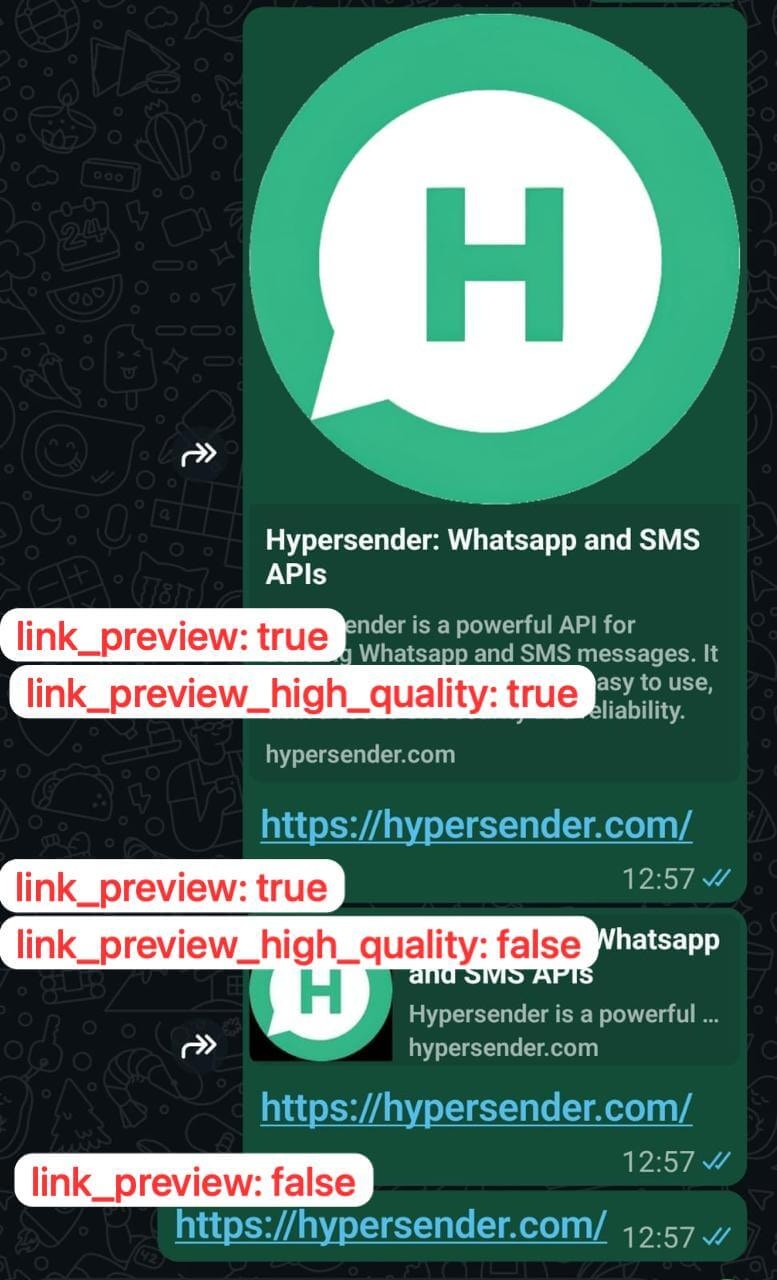
## Sending link preview
If the text has a link - it generates a preview for that link. You can adjust the behaviour by setting
* `link_preview: true` - to enable link preview
* `link_preview_high_quality: true` - to enable high-quality link preview
 You can still send messages directly with `send-text` endpoint, but we highly recommend using this endpoint for regular messaging operations to maintain a more natural communication pattern, and keep your whatsapp number safe from being blocked.
***
## Quick Demo
**Learn how to use Hypersender whatsapp API to send a message using Postman:** [Demo Link](/api-reference/whatsapp/how-to-send-whatsapp-message-in-postman)
## OpenAPI
````yaml v2/api-reference/whatsapp/whatsapp-collection.json POST /{instance}/send-text-safe
openapi: 3.1.0
info:
version: v2.0
title: Hypersender WhatsApp API Docs
description: >
The Hypersender WhatsApp API is a powerful api to send and recieve messages
using your own whatsapp number.
Without the high costs of Meta's Whatsapp business API.
In this Docs you'll learn how to use and integrate Hypersnder Whatsapp API
into your existing system/service or application using simple API endpoints.
## What's New in V2?
**Queued Responses:** All requests in V2 are now queued for improved
reliability and performance. When you make a request, you'll receive an
immediate response with a `queued_request_uuid` that you can use to check
the status of your request.
**Example Response:**
```json
{
"queued": true,
"message": "Processing your request...",
"queued_request_uuid": "a0816120-7e37-4e8b-8cf3-92deb2cdc133",
"queued_request_link": "https://app.hypersender.com/api/whatsapp/v2/{instance}/queued-requests/{queued_request_uuid}"
}
```
Use the `queued_request_link` or the **Get Queued Request** endpoint to
check the actual message response once it's processed.
**What you can Do?**
- Send Text and basic Url messages.
- Send Media through Link or uploaded file.
- Send Audio through Link or uploaded file.
- Send Contact Card
- Send Location
- Send Poll votes
**You can also**
- React to a message
- Forward messages to other chats
- Acknowledge messages (mark as read)
- Star and unstar messages
You can still send messages directly with `send-text` endpoint, but we highly recommend using this endpoint for regular messaging operations to maintain a more natural communication pattern, and keep your whatsapp number safe from being blocked.
***
## Quick Demo
**Learn how to use Hypersender whatsapp API to send a message using Postman:** [Demo Link](/api-reference/whatsapp/how-to-send-whatsapp-message-in-postman)
## OpenAPI
````yaml v2/api-reference/whatsapp/whatsapp-collection.json POST /{instance}/send-text-safe
openapi: 3.1.0
info:
version: v2.0
title: Hypersender WhatsApp API Docs
description: >
The Hypersender WhatsApp API is a powerful api to send and recieve messages
using your own whatsapp number.
Without the high costs of Meta's Whatsapp business API.
In this Docs you'll learn how to use and integrate Hypersnder Whatsapp API
into your existing system/service or application using simple API endpoints.
## What's New in V2?
**Queued Responses:** All requests in V2 are now queued for improved
reliability and performance. When you make a request, you'll receive an
immediate response with a `queued_request_uuid` that you can use to check
the status of your request.
**Example Response:**
```json
{
"queued": true,
"message": "Processing your request...",
"queued_request_uuid": "a0816120-7e37-4e8b-8cf3-92deb2cdc133",
"queued_request_link": "https://app.hypersender.com/api/whatsapp/v2/{instance}/queued-requests/{queued_request_uuid}"
}
```
Use the `queued_request_link` or the **Get Queued Request** endpoint to
check the actual message response once it's processed.
**What you can Do?**
- Send Text and basic Url messages.
- Send Media through Link or uploaded file.
- Send Audio through Link or uploaded file.
- Send Contact Card
- Send Location
- Send Poll votes
**You can also**
- React to a message
- Forward messages to other chats
- Acknowledge messages (mark as read)
- Star and unstar messages
**Quick Demo**
**Learn how to use Hypersender whatsapp API to send a message using Postman:**
[Demo Link](https://app.hypersender.com/send-whatsapp-message-in-postman) **to easily interact with our API.**
**postman collection**
You can download our [Postman
Collection](https://docs.hypersender.com/whatsapp-postman-collection.json)
to easily interact with our API.
## Servers (Endpoints)
- Production (activated):
[https://app.hypersender.com/api/whatsapp/v2](https://app.hypersender.com/api/whatsapp/v2)
servers:
- url: https://app.hypersender.com/api/whatsapp/v2
description: Production
security:
- Authorization: []
paths: {}
components:
securitySchemes:
Authorization:
type: http
scheme: bearer
````