
Getting Started with Hypersender SDK

This guide will walk you through the process of installing and configuring the Hypersender PHP SDK for your Laravel application.

Prerequisites

Before you begin, ensure you have the following:
  • PHP ^8.2 or higher: The SDK requires PHP version 8.2 or higher to function properly.
  • Composer: For package management and dependency resolution
  • Hypersender account: Sign up at Hypersender to obtain your API key and Instance ID.
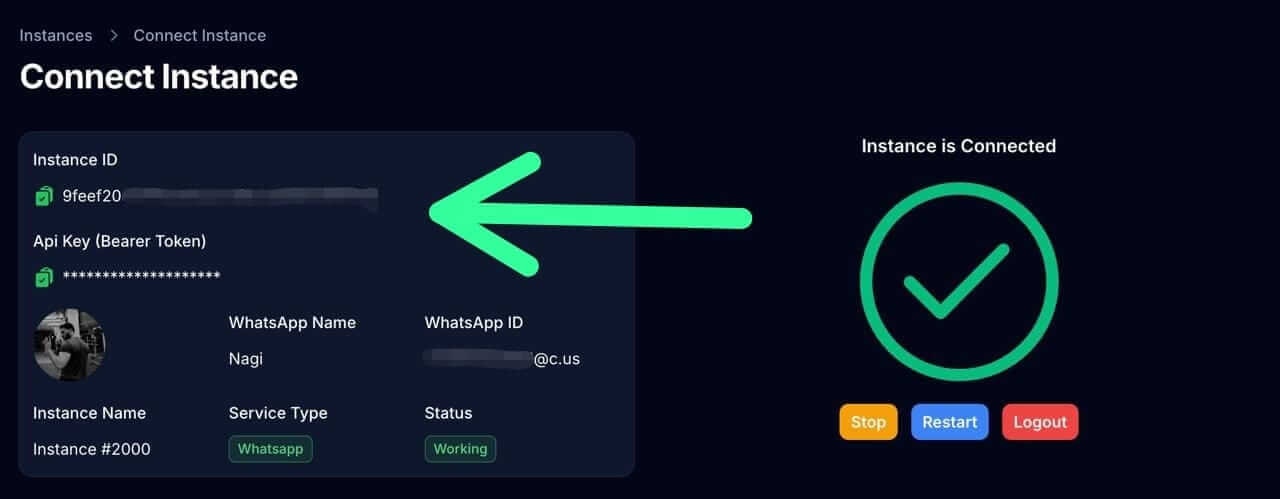
You can find your API key and Instance ID in the Hypersender dashboard
Hypersender Dashboard API Key

Installation

1

Install the SDK via Composer

Run the following command in your terminal to install the Hypersender PHP SDK:
composer require hypersender/hypersender-laravel
After installation, you can verify the package is listed in your composer.json file.
2

Publish the Configuration File

Publish the configuration file using the following Artisan command:
php artisan vendor:publish --tag=hypersender-config
This will create a hypersender-config.php configuration file in your config directory.
3

Configure Environment Variables

Open the hypersender-config.php configuration file, you’ll find different options to set up the SDK to work with Whatsapp API, SMS API or both.For WhatsApp API, set the following environment variables in your .env file:
# API key from Hypersender dashboard
HYPERSENDER_WHATSAPP_API_KEY=
# Instance ID from Hypersender dashboard
HYPERSENDER_WHATSAPP_INSTANCE_ID=
# Webhook header authorization secret
HYPERSENDER_WHATSAPP_WEBHOOK_AUTHORIZATION_SECRET=
# Webhook route to receive incoming messages and status updates
HYPERSENDER_WHATSAPP_WEBHOOK_ROUTE=
# Job class to handle incoming webhook requests
# (use the default or create your own)
HYPERSENDER_WHATSAPP_WEBHOOK_JOB=
# The default queue for processing WhatsApp jobs
HYPERSENDER_WHATSAPP_QUEUE=default
Learn how to get the Hypersender whatsapp API token and Instance ID from Dashboard: Demo Link.
For SMS API, set the following environment variables in your .env file:
# API key from Hypersender dashboard
HYPERSENDER_SMS_API_KEY=
# Instance ID from Hypersender dashboard
HYPERSENDER_SMS_INSTANCE_ID=
# Webhook header authorization secret
HYPERSENDER_SMS_WEBHOOK_AUTHORIZATION_SECRET=
# Webhook route to receive incoming messages and status updates
HYPERSENDER_SMS_WEBHOOK_ROUTE=
# Job class to handle incoming webhook requests
# (use the default or create your own)
HYPERSENDER_SMS_WEBHOOK_JOB=
# The default queue for processing SMS jobs
HYPERSENDER_SMS_QUEUE=default
Learn how to get the Hypersender sms API token and Instance ID from Dashboard: Demo Link.

You’re all set!

You have successfully installed and configured the Hypersender PHP SDK in your Laravel application. You can now start using the SDK to send messages and manage your communications, check out the Usage Guide to learn more about how to use the SDK effectively.