

cURL
curl --request POST \
  --url https://app.hypersender.com/api/whatsapp/v2/{instance}/send-link-custom-preview \
  --header 'Authorization: Bearer <token>' \
  --header 'Content-Type: application/json' \
  --data '
{
  "chatId": "[email protected]",
  "text": "Check this out! https://hypersender.com/",
  "reply_to": "string",
  "high_quality": true,
  "preview_title": "Hypersender is awesome",
  "preview_description": "Check this out, this is a custom link preview!",
  "preview_url": "https://hypersender.com/",
  "preview_image_url": "https://m.media-amazon.com/images/M/MV5BMjRhYjdkOGMtZDY5Zi00OWEwLTlkOWEtYz.jpg"
}
'
import requests
url = "https://app.hypersender.com/api/whatsapp/v2/{instance}/send-link-custom-preview"
payload = {
"chatId": "[email protected]",
"text": "Check this out! https://hypersender.com/",
"reply_to": "string",
"high_quality": True,
"preview_title": "Hypersender is awesome",
"preview_description": "Check this out, this is a custom link preview!",
"preview_url": "https://hypersender.com/",
"preview_image_url": "https://m.media-amazon.com/images/M/MV5BMjRhYjdkOGMtZDY5Zi00OWEwLTlkOWEtYz.jpg"
}
headers = {
"Authorization": "Bearer <token>",
"Content-Type": "application/json"
}
response = requests.post(url, json=payload, headers=headers)
print(response.text)const options = {
method: 'POST',
headers: {Authorization: 'Bearer <token>', 'Content-Type': 'application/json'},
body: JSON.stringify({
chatId: '[email protected]',
text: 'Check this out! https://hypersender.com/',
reply_to: 'string',
high_quality: true,
preview_title: 'Hypersender is awesome',
preview_description: 'Check this out, this is a custom link preview!',
preview_url: 'https://hypersender.com/',
preview_image_url: 'https://m.media-amazon.com/images/M/MV5BMjRhYjdkOGMtZDY5Zi00OWEwLTlkOWEtYz.jpg'
})
};
fetch('https://app.hypersender.com/api/whatsapp/v2/{instance}/send-link-custom-preview', options)
.then(res => res.json())
.then(res => console.log(res))
.catch(err => console.error(err));<?php
$curl = curl_init();
curl_setopt_array($curl, [
CURLOPT_URL => "https://app.hypersender.com/api/whatsapp/v2/{instance}/send-link-custom-preview",
CURLOPT_RETURNTRANSFER => true,
CURLOPT_ENCODING => "",
CURLOPT_MAXREDIRS => 10,
CURLOPT_TIMEOUT => 30,
CURLOPT_HTTP_VERSION => CURL_HTTP_VERSION_1_1,
CURLOPT_CUSTOMREQUEST => "POST",
CURLOPT_POSTFIELDS => json_encode([
'chatId' => '[email protected]',
'text' => 'Check this out! https://hypersender.com/',
'reply_to' => 'string',
'high_quality' => true,
'preview_title' => 'Hypersender is awesome',
'preview_description' => 'Check this out, this is a custom link preview!',
'preview_url' => 'https://hypersender.com/',
'preview_image_url' => 'https://m.media-amazon.com/images/M/MV5BMjRhYjdkOGMtZDY5Zi00OWEwLTlkOWEtYz.jpg'
]),
CURLOPT_HTTPHEADER => [
"Authorization: Bearer <token>",
"Content-Type: application/json"
],
]);
$response = curl_exec($curl);
$err = curl_error($curl);
curl_close($curl);
if ($err) {
echo "cURL Error #:" . $err;
} else {
echo $response;
}package main
import (
"fmt"
"strings"
"net/http"
"io"
)
func main() {
url := "https://app.hypersender.com/api/whatsapp/v2/{instance}/send-link-custom-preview"
payload := strings.NewReader("{\n \"chatId\": \"[email protected]\",\n \"text\": \"Check this out! https://hypersender.com/\",\n \"reply_to\": \"string\",\n \"high_quality\": true,\n \"preview_title\": \"Hypersender is awesome\",\n \"preview_description\": \"Check this out, this is a custom link preview!\",\n \"preview_url\": \"https://hypersender.com/\",\n \"preview_image_url\": \"https://m.media-amazon.com/images/M/MV5BMjRhYjdkOGMtZDY5Zi00OWEwLTlkOWEtYz.jpg\"\n}")
req, _ := http.NewRequest("POST", url, payload)
req.Header.Add("Authorization", "Bearer <token>")
req.Header.Add("Content-Type", "application/json")
res, _ := http.DefaultClient.Do(req)
defer res.Body.Close()
body, _ := io.ReadAll(res.Body)
fmt.Println(string(body))
}HttpResponse<String> response = Unirest.post("https://app.hypersender.com/api/whatsapp/v2/{instance}/send-link-custom-preview")
.header("Authorization", "Bearer <token>")
.header("Content-Type", "application/json")
.body("{\n \"chatId\": \"[email protected]\",\n \"text\": \"Check this out! https://hypersender.com/\",\n \"reply_to\": \"string\",\n \"high_quality\": true,\n \"preview_title\": \"Hypersender is awesome\",\n \"preview_description\": \"Check this out, this is a custom link preview!\",\n \"preview_url\": \"https://hypersender.com/\",\n \"preview_image_url\": \"https://m.media-amazon.com/images/M/MV5BMjRhYjdkOGMtZDY5Zi00OWEwLTlkOWEtYz.jpg\"\n}")
.asString();require 'uri'
require 'net/http'
url = URI("https://app.hypersender.com/api/whatsapp/v2/{instance}/send-link-custom-preview")
http = Net::HTTP.new(url.host, url.port)
http.use_ssl = true
request = Net::HTTP::Post.new(url)
request["Authorization"] = 'Bearer <token>'
request["Content-Type"] = 'application/json'
request.body = "{\n \"chatId\": \"[email protected]\",\n \"text\": \"Check this out! https://hypersender.com/\",\n \"reply_to\": \"string\",\n \"high_quality\": true,\n \"preview_title\": \"Hypersender is awesome\",\n \"preview_description\": \"Check this out, this is a custom link preview!\",\n \"preview_url\": \"https://hypersender.com/\",\n \"preview_image_url\": \"https://m.media-amazon.com/images/M/MV5BMjRhYjdkOGMtZDY5Zi00OWEwLTlkOWEtYz.jpg\"\n}"
response = http.request(request)
puts response.read_body{
"key": {
"remoteJid": "[email protected]",
"fromMe": true,
"id": "3EB091A456D98511123FEA"
},
"message": {
"extendedTextMessage": {
"text": "Check this out! https://hypersender.com/",
"matchedText": "https://hypersender.com/",
"description": "Check this out, this is a custom link preview!",
"title": "Hypersender is awesome",
"previewType": "NONE",
"jpegThumbnail": "/9j/2wBDABALDA4MChAODQ4SERATGCgaGBYWGDEjJR0oOjM9PDkzODdASFxOQERXRTc4UG1RV19iZ2hnPk1xeXBkeFxlZ2P/2wBDARESEhgVGC8aGi9jQjhCY2NjY2NjY2NjY2NjY2NjY2NjY2NjY2NjY2NjY2NjY2NjY2NjY2NjY2NjY2NjY2NjY2P/wAARCAARACADASIAAhEBAxEB/8QAGgAAAgIDAAAAAAAAAAAAAAAAAAUDBAECBv/EACwQAAECBQIEBAcAAAAAAAAAAAECAwAEBREhBjESEzVBYYGDsTI0UXJ0srP/xAAWAQEBAQAAAAAAAAAAAAAAAAABAAL/xAAXEQEBAQEAAAAAAAAAAAAAAAAAARIC/9oADAMBAAIRAxEAPwBi2HEqaUEXTY54hEEjVF1MOrTLqa5V0pJVnfe0Y1CX6fLS77E206gLIIbTw2NsE2ORviI9OzQmWVNKfQ282LhAbCisdzDehI3VU3kVBEutlTbjgt8YORkeREQ1GvKp86gusp5YBTw8YVfxt4WitW5GWS4h+cfcUt10qBKSjt9ADsIpT7NOm5d0tVdgu9kKSc22AO/naDRzDjUHRXPuT7wr0v8ANzH459xBBGSdDqFK9b+cclpjrvpPfoYIIoa//9k=",
"thumbnailDirectPath": "/o1/v/t24/f2/m232/AQMNFP0XcTmGZckNL1WI6_-o4AAzaPTlTtqRat-YC7SlRrlpV8e_0fmUj7xBK5kS_9m4B-3wgG8wJ-aitI6TQqAXSTHEUhH5u4m1QCxRmw?ccb=9-4&oh=01_Q5Aa2gFW4du4I6OfD9Y_djyP1KIukQnFQRfu8YEfQJ6ydbY8JQ&oe=68F20A99&_nc_sid=e6ed6c",
"thumbnailSha256": "KccP5I7AxrmcoUeD868qd0ISDFf6TYUTtw6dJS/Sdjk=",
"thumbnailEncSha256": "Vveij+Avc8amAa2u6AtPSZG/07FzjJfDtMJqmYt/g4A=",
"mediaKey": "Tp1eSebY/WJr+mZmzWmbRAj4WXyEmGsvSKZySAw9Kj8=",
"mediaKeyTimestamp": 1758105918,
"thumbnailHeight": 649,
"thumbnailWidth": 1200
}
},
"messageTimestamp": "1758105918,",
"status": "PENDING"
}{
"message": "Resource not found."
}{
"message": "The given data was invalid.",
"errors": {},
"statusCode": 422
}{
"message": "Internal Server Error"
}Send Link Custom Preview
Send a WhatsApp message with a link preview to enhance engagement and provide context to your recipients.
POST
/
{instance}
/
send-link-custom-preview
cURL
curl --request POST \
  --url https://app.hypersender.com/api/whatsapp/v2/{instance}/send-link-custom-preview \
  --header 'Authorization: Bearer <token>' \
  --header 'Content-Type: application/json' \
  --data '
{
  "chatId": "[email protected]",
  "text": "Check this out! https://hypersender.com/",
  "reply_to": "string",
  "high_quality": true,
  "preview_title": "Hypersender is awesome",
  "preview_description": "Check this out, this is a custom link preview!",
  "preview_url": "https://hypersender.com/",
  "preview_image_url": "https://m.media-amazon.com/images/M/MV5BMjRhYjdkOGMtZDY5Zi00OWEwLTlkOWEtYz.jpg"
}
'
import requests
url = "https://app.hypersender.com/api/whatsapp/v2/{instance}/send-link-custom-preview"
payload = {
"chatId": "[email protected]",
"text": "Check this out! https://hypersender.com/",
"reply_to": "string",
"high_quality": True,
"preview_title": "Hypersender is awesome",
"preview_description": "Check this out, this is a custom link preview!",
"preview_url": "https://hypersender.com/",
"preview_image_url": "https://m.media-amazon.com/images/M/MV5BMjRhYjdkOGMtZDY5Zi00OWEwLTlkOWEtYz.jpg"
}
headers = {
"Authorization": "Bearer <token>",
"Content-Type": "application/json"
}
response = requests.post(url, json=payload, headers=headers)
print(response.text)const options = {
method: 'POST',
headers: {Authorization: 'Bearer <token>', 'Content-Type': 'application/json'},
body: JSON.stringify({
chatId: '[email protected]',
text: 'Check this out! https://hypersender.com/',
reply_to: 'string',
high_quality: true,
preview_title: 'Hypersender is awesome',
preview_description: 'Check this out, this is a custom link preview!',
preview_url: 'https://hypersender.com/',
preview_image_url: 'https://m.media-amazon.com/images/M/MV5BMjRhYjdkOGMtZDY5Zi00OWEwLTlkOWEtYz.jpg'
})
};
fetch('https://app.hypersender.com/api/whatsapp/v2/{instance}/send-link-custom-preview', options)
.then(res => res.json())
.then(res => console.log(res))
.catch(err => console.error(err));<?php
$curl = curl_init();
curl_setopt_array($curl, [
CURLOPT_URL => "https://app.hypersender.com/api/whatsapp/v2/{instance}/send-link-custom-preview",
CURLOPT_RETURNTRANSFER => true,
CURLOPT_ENCODING => "",
CURLOPT_MAXREDIRS => 10,
CURLOPT_TIMEOUT => 30,
CURLOPT_HTTP_VERSION => CURL_HTTP_VERSION_1_1,
CURLOPT_CUSTOMREQUEST => "POST",
CURLOPT_POSTFIELDS => json_encode([
'chatId' => '[email protected]',
'text' => 'Check this out! https://hypersender.com/',
'reply_to' => 'string',
'high_quality' => true,
'preview_title' => 'Hypersender is awesome',
'preview_description' => 'Check this out, this is a custom link preview!',
'preview_url' => 'https://hypersender.com/',
'preview_image_url' => 'https://m.media-amazon.com/images/M/MV5BMjRhYjdkOGMtZDY5Zi00OWEwLTlkOWEtYz.jpg'
]),
CURLOPT_HTTPHEADER => [
"Authorization: Bearer <token>",
"Content-Type: application/json"
],
]);
$response = curl_exec($curl);
$err = curl_error($curl);
curl_close($curl);
if ($err) {
echo "cURL Error #:" . $err;
} else {
echo $response;
}package main
import (
"fmt"
"strings"
"net/http"
"io"
)
func main() {
url := "https://app.hypersender.com/api/whatsapp/v2/{instance}/send-link-custom-preview"
payload := strings.NewReader("{\n \"chatId\": \"[email protected]\",\n \"text\": \"Check this out! https://hypersender.com/\",\n \"reply_to\": \"string\",\n \"high_quality\": true,\n \"preview_title\": \"Hypersender is awesome\",\n \"preview_description\": \"Check this out, this is a custom link preview!\",\n \"preview_url\": \"https://hypersender.com/\",\n \"preview_image_url\": \"https://m.media-amazon.com/images/M/MV5BMjRhYjdkOGMtZDY5Zi00OWEwLTlkOWEtYz.jpg\"\n}")
req, _ := http.NewRequest("POST", url, payload)
req.Header.Add("Authorization", "Bearer <token>")
req.Header.Add("Content-Type", "application/json")
res, _ := http.DefaultClient.Do(req)
defer res.Body.Close()
body, _ := io.ReadAll(res.Body)
fmt.Println(string(body))
}HttpResponse<String> response = Unirest.post("https://app.hypersender.com/api/whatsapp/v2/{instance}/send-link-custom-preview")
.header("Authorization", "Bearer <token>")
.header("Content-Type", "application/json")
.body("{\n \"chatId\": \"[email protected]\",\n \"text\": \"Check this out! https://hypersender.com/\",\n \"reply_to\": \"string\",\n \"high_quality\": true,\n \"preview_title\": \"Hypersender is awesome\",\n \"preview_description\": \"Check this out, this is a custom link preview!\",\n \"preview_url\": \"https://hypersender.com/\",\n \"preview_image_url\": \"https://m.media-amazon.com/images/M/MV5BMjRhYjdkOGMtZDY5Zi00OWEwLTlkOWEtYz.jpg\"\n}")
.asString();require 'uri'
require 'net/http'
url = URI("https://app.hypersender.com/api/whatsapp/v2/{instance}/send-link-custom-preview")
http = Net::HTTP.new(url.host, url.port)
http.use_ssl = true
request = Net::HTTP::Post.new(url)
request["Authorization"] = 'Bearer <token>'
request["Content-Type"] = 'application/json'
request.body = "{\n \"chatId\": \"[email protected]\",\n \"text\": \"Check this out! https://hypersender.com/\",\n \"reply_to\": \"string\",\n \"high_quality\": true,\n \"preview_title\": \"Hypersender is awesome\",\n \"preview_description\": \"Check this out, this is a custom link preview!\",\n \"preview_url\": \"https://hypersender.com/\",\n \"preview_image_url\": \"https://m.media-amazon.com/images/M/MV5BMjRhYjdkOGMtZDY5Zi00OWEwLTlkOWEtYz.jpg\"\n}"
response = http.request(request)
puts response.read_body{
"key": {
"remoteJid": "[email protected]",
"fromMe": true,
"id": "3EB091A456D98511123FEA"
},
"message": {
"extendedTextMessage": {
"text": "Check this out! https://hypersender.com/",
"matchedText": "https://hypersender.com/",
"description": "Check this out, this is a custom link preview!",
"title": "Hypersender is awesome",
"previewType": "NONE",
"jpegThumbnail": "/9j/2wBDABALDA4MChAODQ4SERATGCgaGBYWGDEjJR0oOjM9PDkzODdASFxOQERXRTc4UG1RV19iZ2hnPk1xeXBkeFxlZ2P/2wBDARESEhgVGC8aGi9jQjhCY2NjY2NjY2NjY2NjY2NjY2NjY2NjY2NjY2NjY2NjY2NjY2NjY2NjY2NjY2NjY2NjY2P/wAARCAARACADASIAAhEBAxEB/8QAGgAAAgIDAAAAAAAAAAAAAAAAAAUDBAECBv/EACwQAAECBQIEBAcAAAAAAAAAAAECAwAEBREhBjESEzVBYYGDsTI0UXJ0srP/xAAWAQEBAQAAAAAAAAAAAAAAAAABAAL/xAAXEQEBAQEAAAAAAAAAAAAAAAAAARIC/9oADAMBAAIRAxEAPwBi2HEqaUEXTY54hEEjVF1MOrTLqa5V0pJVnfe0Y1CX6fLS77E206gLIIbTw2NsE2ORviI9OzQmWVNKfQ282LhAbCisdzDehI3VU3kVBEutlTbjgt8YORkeREQ1GvKp86gusp5YBTw8YVfxt4WitW5GWS4h+cfcUt10qBKSjt9ADsIpT7NOm5d0tVdgu9kKSc22AO/naDRzDjUHRXPuT7wr0v8ANzH459xBBGSdDqFK9b+cclpjrvpPfoYIIoa//9k=",
"thumbnailDirectPath": "/o1/v/t24/f2/m232/AQMNFP0XcTmGZckNL1WI6_-o4AAzaPTlTtqRat-YC7SlRrlpV8e_0fmUj7xBK5kS_9m4B-3wgG8wJ-aitI6TQqAXSTHEUhH5u4m1QCxRmw?ccb=9-4&oh=01_Q5Aa2gFW4du4I6OfD9Y_djyP1KIukQnFQRfu8YEfQJ6ydbY8JQ&oe=68F20A99&_nc_sid=e6ed6c",
"thumbnailSha256": "KccP5I7AxrmcoUeD868qd0ISDFf6TYUTtw6dJS/Sdjk=",
"thumbnailEncSha256": "Vveij+Avc8amAa2u6AtPSZG/07FzjJfDtMJqmYt/g4A=",
"mediaKey": "Tp1eSebY/WJr+mZmzWmbRAj4WXyEmGsvSKZySAw9Kj8=",
"mediaKeyTimestamp": 1758105918,
"thumbnailHeight": 649,
"thumbnailWidth": 1200
}
},
"messageTimestamp": "1758105918,",
"status": "PENDING"
}{
"message": "Resource not found."
}{
"message": "The given data was invalid.",
"errors": {},
"statusCode": 422
}{
"message": "Internal Server Error"
}V2 Queued Response: All API requests in V2 are queued for improved reliability. You’ll receive an immediate response with a
queued_request_uuid that you can use to check the actual message status.Response Format
All requests return a queued response:{
"queued": true,
"message": "Processing your request...",
"queued_request_uuid": "a0816120-7e37-4e8b-8cf3-92deb2cdc133",
"queued_request_link": "https://app.hypersender.com/api/whatsapp/v2/{instance}/queued-requests/a0816120-7e37-4e8b-8cf3-92deb2cdc133"
}
queued_request_link or the Get Queued Request endpoint to check the actual message response once it’s processed.
More details on queued requests can be found in the Queued Requests Documentation.
This feature is only available for subscribed accounts.
send-text or send-text-safe you can send auto-generated link previews.
You can send custom link preview in two ways:
Provide a URL for the image.
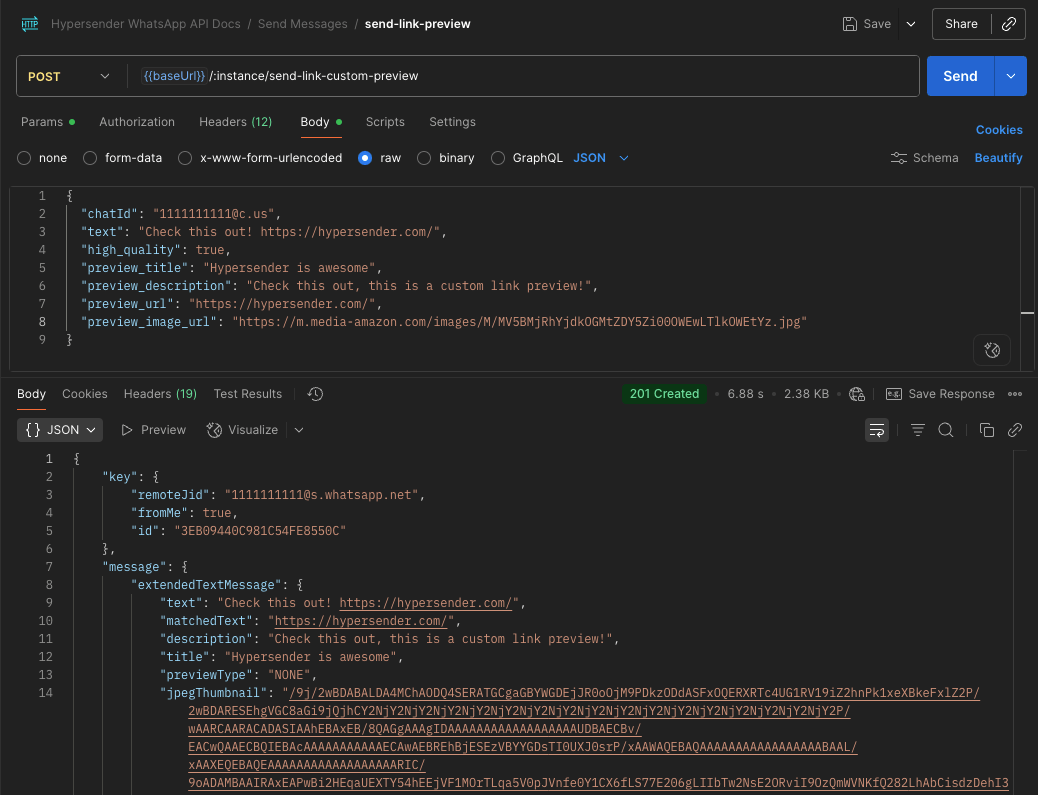
WhatsApp requires the text to contain the preview URL anywhere in the text.Example:
"text": "Check this out! https://hypersender.com/"Please note that the URL must be publicly accessible and not require any authentication or special headers to access the file.
Send the image it self as a file upload.
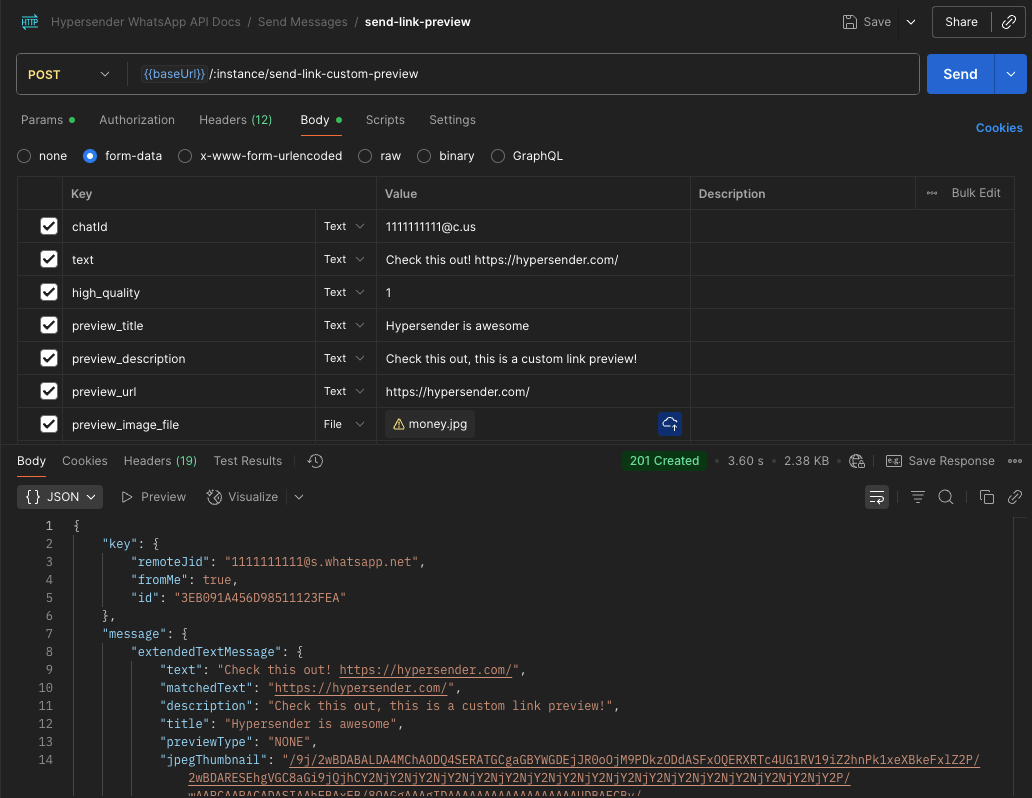
By specifying the
high_quality parameter as true, you can get a higher quality image.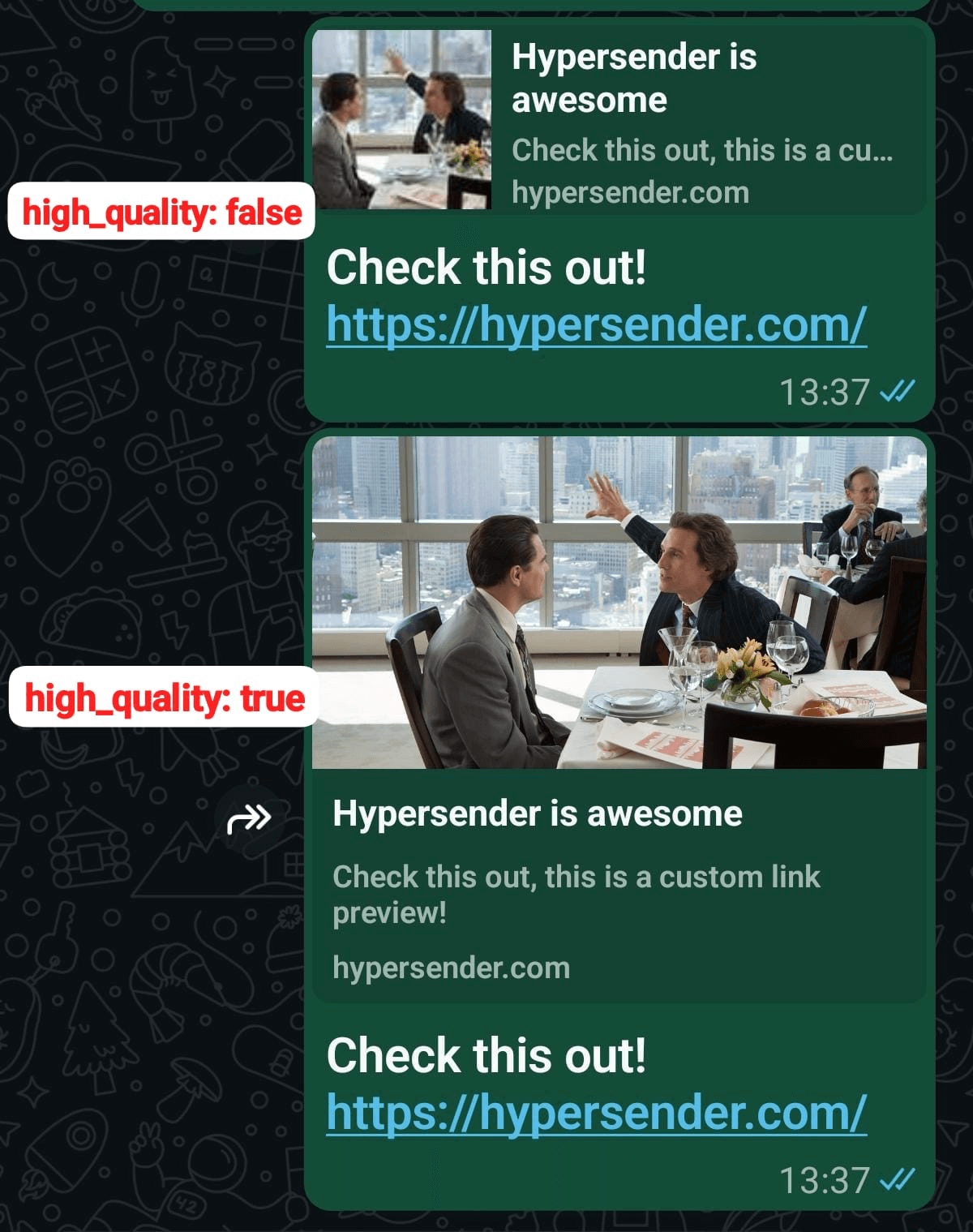
Authorizations
Bearer authentication header of the form Bearer <token>, where <token> is your auth token.
Path Parameters
Instance UUID copied from hypersender dashboard
Example:
"{{ instance_id }}"
Body
application/json
Contact number - learn what is chatId
Example:
text should contain the url to send
title of the link preview
description of the link preview
must be a valid URL
URL of the image to be used in the link preview - (only if preview_image_file is not provided)
file of the image to be used in the link preview - (only if preview_image_url is not provided)
reply to message id
high quality for the image