POST
/
{instance}
/
send-text
cURL
curl --request POST \
  --url https://app.hypersender.com/api/whatsapp/v2/{instance}/send-text \
  --header 'Authorization: Bearer <token>' \
  --header 'Content-Type: application/json' \
  --data '
{
  "chatId": "[email protected]",
  "text": "<string>",
  "reply_to": "<string>",
  "link_preview": true,
  "link_preview_high_quality": true
}
'
{
  "key": {
    "remoteJid": "<string>",
    "fromMe": true,
    "id": "<string>"
  },
  "message": {
    "extendedTextMessage": {
      "text": "<string>"
    }
  },
  "messageTimestamp": "<string>",
  "status": "<string>"
}
V2 Queued Response: All API requests in V2 are queued for improved reliability. You’ll receive an immediate response with a queued_request_uuid that you can use to check the actual message status.

Response Format

All requests return a queued response:
{
    "queued": true,
    "message": "Processing your request...",
    "queued_request_uuid": "a0816120-7e37-4e8b-8cf3-92deb2cdc133",
    "queued_request_link": "https://app.hypersender.com/api/whatsapp/v2/{instance}/queued-requests/a0816120-7e37-4e8b-8cf3-92deb2cdc133"
}
Use the queued_request_link or the Get Queued Request endpoint to check the actual message response once it’s processed. More details on queued requests can be found in the Queued Requests Documentation.
Send links and simple texts to a WhatsApp
  • Chat
  • Group
  • Recipient
We highly recommend using the send-text-safe endpoint for regular messaging operations to maintain a more natural communication pattern, and keep your whatsapp number safe from being blocked.
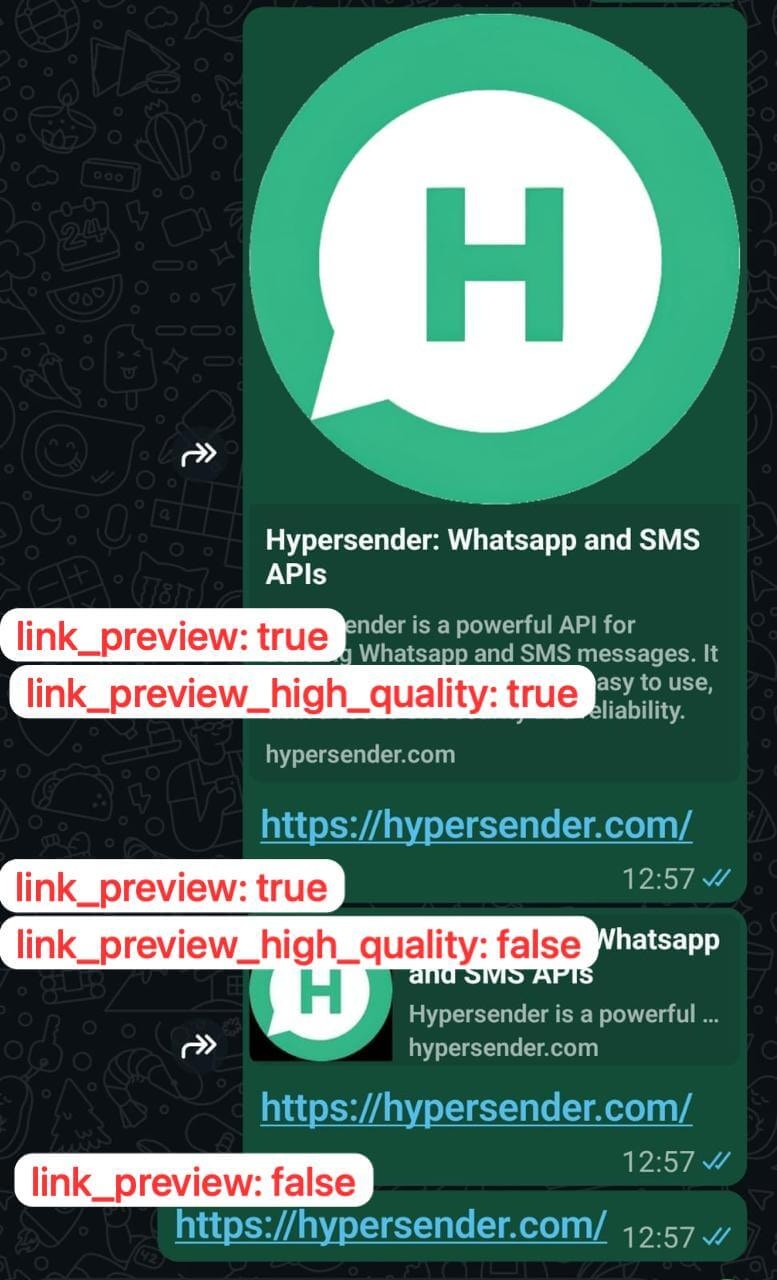
If the text has a link - it generates a preview for that link. You can adjust the behaviour by setting
  • link_preview: true - to enable link preview
  • link_preview_high_quality: true - to enable high-quality link preview
send-text send link preview

Quick Demo

Learn how to use Hypersender whatsapp API to send a message using Postman: Demo Link

Authorizations

Authorization
string
header
required

Bearer authentication header of the form Bearer <token>, where <token> is your auth token.

Headers

Accept
string

application/json

Example:

"application/json"

Content-Type
string

application/json

Example:

"application/json"

Path Parameters

instance
string
required

Instance UUID copied from hypersender dashboard

Example:

"{{ instance_id }}"

Body

application/json
chatId
string
required

Contact number - learn what is chatId

text
string
required

Text Message

reply_to
string

Reply to message id

Link Preview

Link Preview High Quality

Response

Successful response

key
object
message
object
messageTimestamp
string
status
string