

cURL
curl --request POST \
  --url https://app.hypersender.com/api/whatsapp/v2/{instance}/send-location \
  --header 'Authorization: Bearer <token>' \
  --header 'Content-Type: application/json' \
  --data '
{
  "chatId": "[email protected]",
  "latitude": 38.8937255,
  "longitude": -77.0969763,
  "title": "Our office",
  "reply_to": "string"
}
'
import requests
url = "https://app.hypersender.com/api/whatsapp/v2/{instance}/send-location"
payload = {
"chatId": "[email protected]",
"latitude": 38.8937255,
"longitude": -77.0969763,
"title": "Our office",
"reply_to": "string"
}
headers = {
"Authorization": "Bearer <token>",
"Content-Type": "application/json"
}
response = requests.post(url, json=payload, headers=headers)
print(response.text)const options = {
method: 'POST',
headers: {Authorization: 'Bearer <token>', 'Content-Type': 'application/json'},
body: JSON.stringify({
chatId: '[email protected]',
latitude: 38.8937255,
longitude: -77.0969763,
title: 'Our office',
reply_to: 'string'
})
};
fetch('https://app.hypersender.com/api/whatsapp/v2/{instance}/send-location', options)
.then(res => res.json())
.then(res => console.log(res))
.catch(err => console.error(err));<?php
$curl = curl_init();
curl_setopt_array($curl, [
CURLOPT_URL => "https://app.hypersender.com/api/whatsapp/v2/{instance}/send-location",
CURLOPT_RETURNTRANSFER => true,
CURLOPT_ENCODING => "",
CURLOPT_MAXREDIRS => 10,
CURLOPT_TIMEOUT => 30,
CURLOPT_HTTP_VERSION => CURL_HTTP_VERSION_1_1,
CURLOPT_CUSTOMREQUEST => "POST",
CURLOPT_POSTFIELDS => json_encode([
'chatId' => '[email protected]',
'latitude' => 38.8937255,
'longitude' => -77.0969763,
'title' => 'Our office',
'reply_to' => 'string'
]),
CURLOPT_HTTPHEADER => [
"Authorization: Bearer <token>",
"Content-Type: application/json"
],
]);
$response = curl_exec($curl);
$err = curl_error($curl);
curl_close($curl);
if ($err) {
echo "cURL Error #:" . $err;
} else {
echo $response;
}package main
import (
"fmt"
"strings"
"net/http"
"io"
)
func main() {
url := "https://app.hypersender.com/api/whatsapp/v2/{instance}/send-location"
payload := strings.NewReader("{\n \"chatId\": \"[email protected]\",\n \"latitude\": 38.8937255,\n \"longitude\": -77.0969763,\n \"title\": \"Our office\",\n \"reply_to\": \"string\"\n}")
req, _ := http.NewRequest("POST", url, payload)
req.Header.Add("Authorization", "Bearer <token>")
req.Header.Add("Content-Type", "application/json")
res, _ := http.DefaultClient.Do(req)
defer res.Body.Close()
body, _ := io.ReadAll(res.Body)
fmt.Println(string(body))
}HttpResponse<String> response = Unirest.post("https://app.hypersender.com/api/whatsapp/v2/{instance}/send-location")
.header("Authorization", "Bearer <token>")
.header("Content-Type", "application/json")
.body("{\n \"chatId\": \"[email protected]\",\n \"latitude\": 38.8937255,\n \"longitude\": -77.0969763,\n \"title\": \"Our office\",\n \"reply_to\": \"string\"\n}")
.asString();require 'uri'
require 'net/http'
url = URI("https://app.hypersender.com/api/whatsapp/v2/{instance}/send-location")
http = Net::HTTP.new(url.host, url.port)
http.use_ssl = true
request = Net::HTTP::Post.new(url)
request["Authorization"] = 'Bearer <token>'
request["Content-Type"] = 'application/json'
request.body = "{\n \"chatId\": \"[email protected]\",\n \"latitude\": 38.8937255,\n \"longitude\": -77.0969763,\n \"title\": \"Our office\",\n \"reply_to\": \"string\"\n}"
response = http.request(request)
puts response.read_body{
"key": {
"remoteJid": "[email protected],",
"fromMe": "true,",
"id": "3EB0CD3810439716606547"
},
"message": {
"locationMessage": {
"degreesLatitude": 38.8937255,
"degreesLongitude": -77.0969763
}
},
"messageTimestamp": 1741359489,
"status": "PENDING"
}Send Location
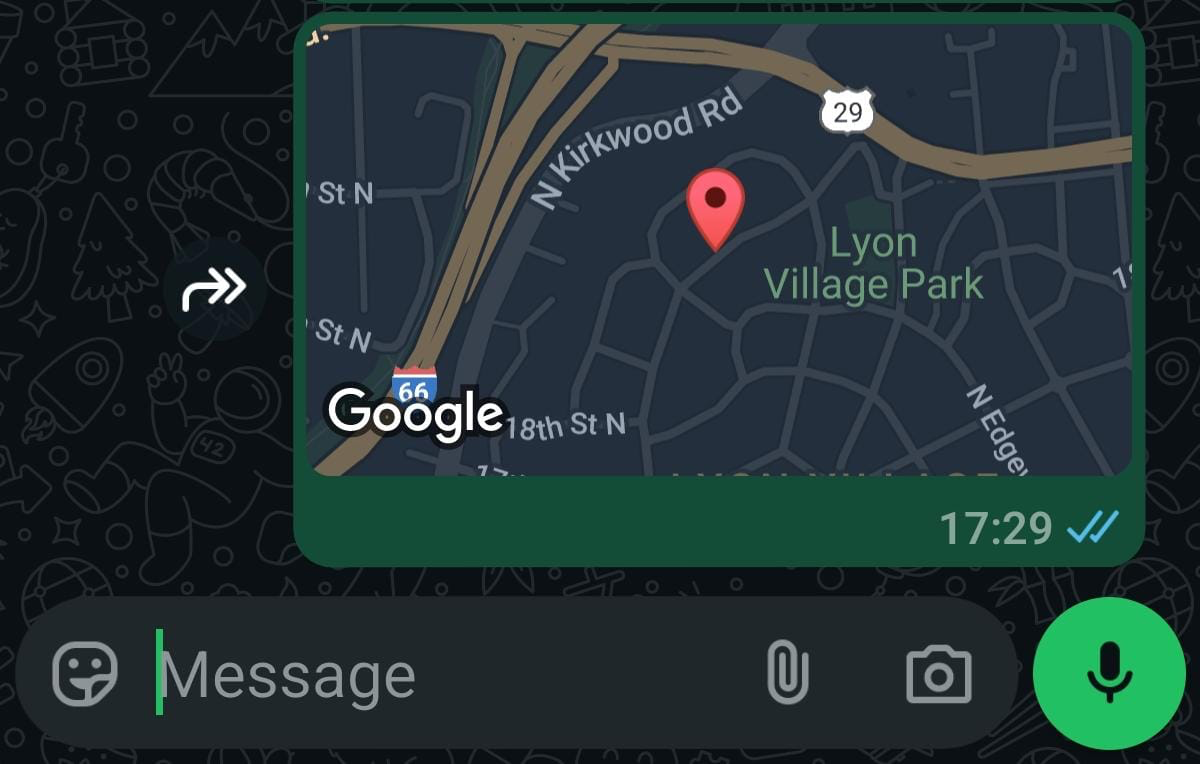
You can send a location to a chat by providing latitude and longitude coordinates.
POST
/
{instance}
/
send-location
cURL
curl --request POST \
  --url https://app.hypersender.com/api/whatsapp/v2/{instance}/send-location \
  --header 'Authorization: Bearer <token>' \
  --header 'Content-Type: application/json' \
  --data '
{
  "chatId": "[email protected]",
  "latitude": 38.8937255,
  "longitude": -77.0969763,
  "title": "Our office",
  "reply_to": "string"
}
'
import requests
url = "https://app.hypersender.com/api/whatsapp/v2/{instance}/send-location"
payload = {
"chatId": "[email protected]",
"latitude": 38.8937255,
"longitude": -77.0969763,
"title": "Our office",
"reply_to": "string"
}
headers = {
"Authorization": "Bearer <token>",
"Content-Type": "application/json"
}
response = requests.post(url, json=payload, headers=headers)
print(response.text)const options = {
method: 'POST',
headers: {Authorization: 'Bearer <token>', 'Content-Type': 'application/json'},
body: JSON.stringify({
chatId: '[email protected]',
latitude: 38.8937255,
longitude: -77.0969763,
title: 'Our office',
reply_to: 'string'
})
};
fetch('https://app.hypersender.com/api/whatsapp/v2/{instance}/send-location', options)
.then(res => res.json())
.then(res => console.log(res))
.catch(err => console.error(err));<?php
$curl = curl_init();
curl_setopt_array($curl, [
CURLOPT_URL => "https://app.hypersender.com/api/whatsapp/v2/{instance}/send-location",
CURLOPT_RETURNTRANSFER => true,
CURLOPT_ENCODING => "",
CURLOPT_MAXREDIRS => 10,
CURLOPT_TIMEOUT => 30,
CURLOPT_HTTP_VERSION => CURL_HTTP_VERSION_1_1,
CURLOPT_CUSTOMREQUEST => "POST",
CURLOPT_POSTFIELDS => json_encode([
'chatId' => '[email protected]',
'latitude' => 38.8937255,
'longitude' => -77.0969763,
'title' => 'Our office',
'reply_to' => 'string'
]),
CURLOPT_HTTPHEADER => [
"Authorization: Bearer <token>",
"Content-Type: application/json"
],
]);
$response = curl_exec($curl);
$err = curl_error($curl);
curl_close($curl);
if ($err) {
echo "cURL Error #:" . $err;
} else {
echo $response;
}package main
import (
"fmt"
"strings"
"net/http"
"io"
)
func main() {
url := "https://app.hypersender.com/api/whatsapp/v2/{instance}/send-location"
payload := strings.NewReader("{\n \"chatId\": \"[email protected]\",\n \"latitude\": 38.8937255,\n \"longitude\": -77.0969763,\n \"title\": \"Our office\",\n \"reply_to\": \"string\"\n}")
req, _ := http.NewRequest("POST", url, payload)
req.Header.Add("Authorization", "Bearer <token>")
req.Header.Add("Content-Type", "application/json")
res, _ := http.DefaultClient.Do(req)
defer res.Body.Close()
body, _ := io.ReadAll(res.Body)
fmt.Println(string(body))
}HttpResponse<String> response = Unirest.post("https://app.hypersender.com/api/whatsapp/v2/{instance}/send-location")
.header("Authorization", "Bearer <token>")
.header("Content-Type", "application/json")
.body("{\n \"chatId\": \"[email protected]\",\n \"latitude\": 38.8937255,\n \"longitude\": -77.0969763,\n \"title\": \"Our office\",\n \"reply_to\": \"string\"\n}")
.asString();require 'uri'
require 'net/http'
url = URI("https://app.hypersender.com/api/whatsapp/v2/{instance}/send-location")
http = Net::HTTP.new(url.host, url.port)
http.use_ssl = true
request = Net::HTTP::Post.new(url)
request["Authorization"] = 'Bearer <token>'
request["Content-Type"] = 'application/json'
request.body = "{\n \"chatId\": \"[email protected]\",\n \"latitude\": 38.8937255,\n \"longitude\": -77.0969763,\n \"title\": \"Our office\",\n \"reply_to\": \"string\"\n}"
response = http.request(request)
puts response.read_body{
"key": {
"remoteJid": "[email protected],",
"fromMe": "true,",
"id": "3EB0CD3810439716606547"
},
"message": {
"locationMessage": {
"degreesLatitude": 38.8937255,
"degreesLongitude": -77.0969763
}
},
"messageTimestamp": 1741359489,
"status": "PENDING"
}V2 Queued Response: All API requests in V2 are queued for improved reliability. You’ll receive an immediate response with a
queued_request_uuid that you can use to check the actual message status.Response Format
All requests return a queued response:{
"queued": true,
"message": "Processing your request...",
"queued_request_uuid": "a0816120-7e37-4e8b-8cf3-92deb2cdc133",
"queued_request_link": "https://app.hypersender.com/api/whatsapp/v2/{instance}/queued-requests/a0816120-7e37-4e8b-8cf3-92deb2cdc133"
}
queued_request_link or the Get Queued Request endpoint to check the actual message response once it’s processed.
More details on queued requests can be found in the Queued Requests Documentation.
Send location to a chat
Authorizations
Bearer authentication header of the form Bearer <token>, where <token> is your auth token.
Headers
application/json
Example:
"application/json"
application/json
Example:
"application/json"
Path Parameters
Instance UUID copied from hypersender dashboard
Example:
"{{ instance_id }}"
Body
application/json