

Send Text Safe
Safely send a WhatsApp text message with human-like pacing, typing simulation, and optional rich link previews to reduce block risk.
POST
cURL
V2 Queued Response: All API requests in V2 are queued for improved reliability. You’ll receive an immediate response with a
queued_request_uuid that you can use to check the actual message status.Response Format
All requests return a queued response:queued_request_link or the Get Queued Request endpoint to check the actual message response once it’s processed.
More details on queued requests can be found in the Queued Requests Documentation.
Send Text Message Safe
The Send Text Safe endpoint functions similarly to the standard send-text endpoint but with enhanced safety features designed specifically to protect your WhatsApp number from being blocked or flagged for suspicious activity.It:
- Automatically calculates the appropriate delay between messages based on text length, by adding a few seconds for thinking/reviewing before sending
- Simulates typing behavior in WhatsApp before sending the message
- Significantly reduces the risk of your WhatsApp number being blocked due to automated messaging patterns
- Reduces the risk of being flagged for automated behavior
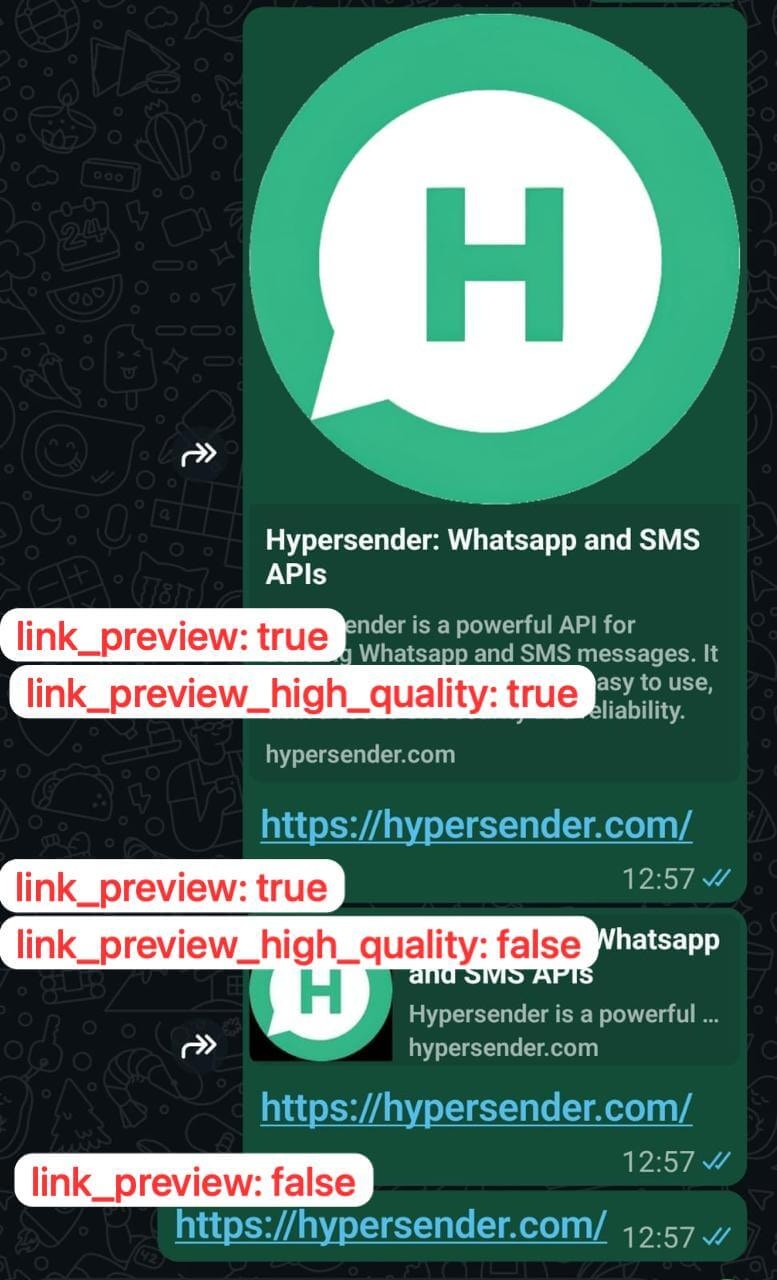
Sending link preview
If the text has a link - it generates a preview for that link. You can adjust the behaviour by settinglink_preview: true- to enable link previewlink_preview_high_quality: true- to enable high-quality link preview
You can still send messages directly with
send-text endpoint, but we highly recommend using this endpoint for regular messaging operations to maintain a more natural communication pattern, and keep your whatsapp number safe from being blocked.Quick Demo
Authorizations
Bearer authentication header of the form Bearer <token>, where <token> is your auth token.
Headers
application/json
Example:
"application/json"
application/json
Example:
"application/json"
Path Parameters
Instance UUID copied from hypersender dashboard
Example:
"{{ instance_id }}"
Body
application/json